← Back
Lifestyle · Web App · 2026

Standin: Activity Companion Platform

A full-stack web platform where users browse and book companions for activities, from hiking and museum visits to cooking classes and city tours.

First coding project · built solo
Standin website
Role
Full-stack Developer
Timeline
12 weeks
Platform
Web app
Tools
Supabase
Overview

Connecting people through shared activities

Standin is a marketplace platform that solves a simple but underserved problem: finding someone to do things with. Whether it's a museum visit, a hike, a cooking class, or a weekend city tour, the platform lets users browse verified companions, filter by activity type and availability, and book directly through a streamlined checkout flow.

The project started from the observation that existing platforms for companion services were either overly complex, poorly designed, or lacked trust signals. Users needed a clean, transparent experience: see who's available, read reviews, pick a time, and book. No hidden fees, no endless forms.

Built as a solo full-stack project over twelve weeks, Standin ships a responsive multi-page frontend backed by Supabase (Postgres with row-level security, authentication and file storage), a set of TypeScript edge functions for the server-side logic, Stripe Checkout for payments, and an availability system that prevents double bookings. The codebase is organised around clear domain boundaries so it can grow from MVP toward production without a rewrite.

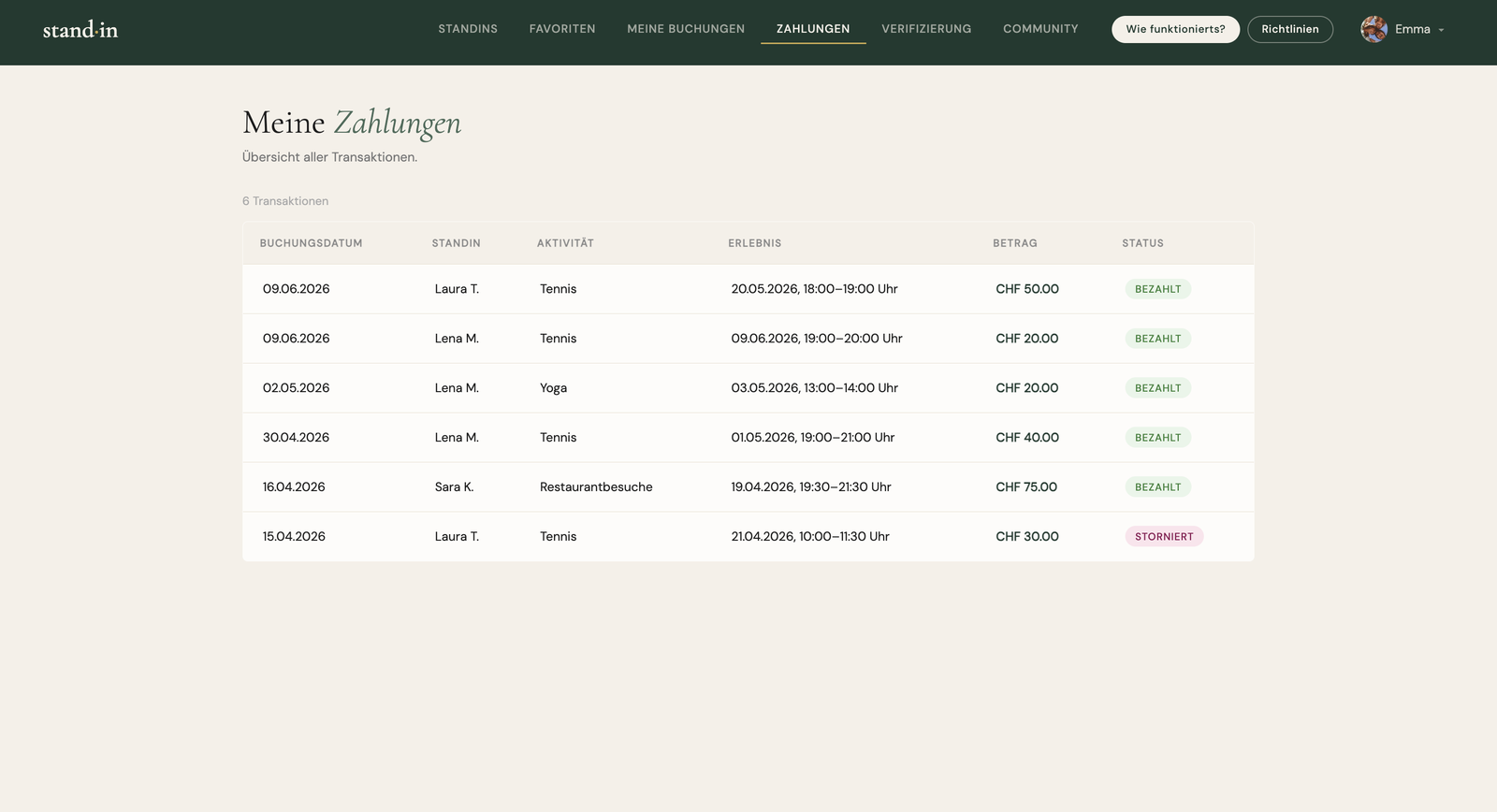
The platform handles the full lifecycle: companion onboarding, activity listings, search and discovery with city, date and interest filters, slot-based booking, secure Stripe payments, transactional email, cancellation with refunds, and a review system that builds trust over time.

The challenge

Trust, payments, and real-time availability

Building a two-sided marketplace means solving for both sides simultaneously. Companions need easy onboarding and schedule management. Users need trust signals, transparent pricing, and instant confirmation. The technical challenge: making all of that feel simple.

The goal

Make a two-sided marketplace feel simple

Deliver a working platform where companions can onboard and manage their availability with ease, and users can find someone, see transparent pricing and book with instant confirmation, making a complex two-sided system feel effortless on both sides.

My role

Design, build, ship, end to end

As the sole developer, I owned every layer from database schema to deployed frontend. The work spanned architecture decisions, implementation, testing, and deployment. I worked in an AI-assisted workflow, using Claude to accelerate implementation while owning the architecture and every key decision myself.

I had the bulk of the app standing within a few days. The real work came after that: testing every function and debugging the errors that surfaced, while new features kept being added along the way. That cycle, not the initial build, is where most of the time went.

My way of working was deliberate and incremental, a bit like building with Lego. For each page and each function I told Claude exactly what I had in mind, looked closely at what it produced, and used that as a scaffold to build on. I checked what I liked, what I didn't, and what was still missing, then kept building on top of it, step by step, until the page or function did what it should. I repeated that same loop for every part of the product. Throughout, I focused about 90% on function and less on the visual design: I only changed the design when it really didn't match what I had in mind, or when it got in the way of how the function was meant to be used.

I also set up a large part of the infrastructure myself: creating the accounts for Supabase, Vercel, Stripe and the other services, and wiring them all together into one working system.

Architecture
  • System architecture
  • Database schema & access rules
Development
  • API development & integration
  • Frontend & responsive UI
  • Payment integration
Delivery
  • Security & KYC
  • Deployment & infrastructure
Tech Stack

What Standin is built with

The platform runs on static HTML pages with vanilla JavaScript, deployed on Vercel with Supabase as its backend. I designed and shipped it as a solo project with AI-assisted development, making the product, data-model and architecture decisions, integrating the services, and handling testing and deployment. The stack is deliberately lean: no build step, no bundler, no framework, no package.json, just static HTML and CSS with the Cormorant Garamond and DM Sans typefaces from Google Fonts. The pages communicate with Supabase directly from the browser, which keeps the build simple to ship and easy to serve from any static host or CDN.

Supabase provides the Postgres database, the authentication and the file storage, with the server-side logic written as serverless edge functions in TypeScript for the Deno runtime, covering checkout, the Stripe webhook, identity verification, booking cancellation, account deletion and email. Stripe handles payments, refunds and Identity for KYC, the step where trust is built, while Resend sends the transactional email. The static frontend is deployed on Vercel, the code is versioned with Git, and the Supabase and Stripe MCP servers are wired in for AI-assisted development.

  • HTML, CSS & vanilla JavaScript · static frontend, no build step
  • Supabase · Postgres, Auth & Storage
  • TypeScript (Deno) · serverless edge functions
  • Stripe · payments, refunds & Identity (KYC)
  • Resend · transactional email
  • Google Fonts · Cormorant Garamond & DM Sans
  • supabase-js v2 · client library (CDN)
  • Vercel · hosting & deployment
  • Git · version control
  • Supabase & Stripe MCP · live DB & payment context for the AI
  • Visual Studio Code · editor
  • Claude · AI-assisted development
Architecture

Structured around domain boundaries

The application is split into four bounded domains. Each domain owns its data, edge functions, and business logic, keeping the codebase navigable as features grow.

Standin Platform
Identity
Auth (Supabase)
Onboarding
Profiles
Marketplace
Listings
Search & Filter
Reviews
Booking
Availability
Reservations
Cancellation
Payments
Stripe Checkout
Webhook
Refunds
Development Flow

From schema to deployed feature

Every feature followed the same loop: data and access rules first, server logic second, UI last. Working in that order caught data-model and permission mistakes before any interface code existed. The booking flow below is the clearest example.

01
Schema & access rules
Model the tables in Supabase (profiles, availability, bookings) and write the row-level-security policies up front, including the privacy rule that hides a companion's photo until a booking exists.
02
Edge function & validation
Write the server logic as a typed Supabase edge function. create-checkout verifies the login, checks the slot is still free, rejects overlapping bookings, then opens a Stripe Checkout session.
03
Payment & webhook
Stripe handles the payment; a signature-verified webhook writes the booking with status “confirmed”. Idempotency via the Stripe session id means a replayed event never creates a duplicate.
04
Frontend & edge cases
Wire the page to the verified logic: load the free slots, call the function, redirect to Stripe. Then break it on purpose: rejected cards, double bookings, expired slots, a refresh mid-flow.
05
Test & deploy
Run the manual end-to-end checklist and moderated usability sessions, then deploy the functions to Supabase and the static frontend to Vercel.
User Flow UX

From browsing to a confirmed booking

The core journey had to feel effortless on both sides: a customer finding and booking a companion, and a companion staying in control of who, when and for what.

01
Discover
Browse companions and filter by city, date and interest. A companion's photo stays hidden until a booking exists, a deliberate privacy rule.
02
View profile
Open a companion's full profile (bio, activities, per-activity prices, verification and reviews) to decide if they're the right fit.
03
Pick a slot
Choose an available time from the companion's calendar. Only slots they entered themselves can be booked.
04
Set the details
Pick one of the activities offered, give a public meeting point and add an optional message, which becomes the first message in the chat.
05
Pay
Complete payment via Stripe Checkout. The booking is only written once the signed webhook confirms the payment, with no ghost bookings.
06
Meet & review
After the meeting the customer rates the companion. Plans can change too: a booking is cancellable up to 24 hours before, and the companion is notified.
Database Design

One profile table for two roles

The schema runs on Supabase Postgres and centres on a single profiles table that holds both customers and companions, distinguished by a role column and mapped one-to-one onto Supabase Auth. Around it sit roughly a dozen tables for bookings, availability, reviews, messaging, community and operations, all linked back to profiles and guarded by row-level security.

availability standin_id
bookings customer_id · standin_id
reviews reviewer_id · standin_id
favorites customer_id · standin_id
profiles id = Auth user · role
notifications user_id
messages sender_id · receiver_id
community_posts user_id · partner_id
payout_requests standin_id

Core tables

profiles one table for both roles, distinguished by role
idpk= Supabase Auth user id
rolecustomer or standin
price_chf · activity_type · specializationsa companion's offer
verification_* · id_document_urlidentity verification (KYC)
is_* flags · deleted_atmoderation & soft delete
bookings a customer ↔ a companion
customer_id · standin_idfk→ profiles
availability_idfk→ the booked slot
statusopen / confirmed / cancelled
stripe_session_idlink to the Stripe payment
availability slots a companion offers
standin_idfk→ profiles · whose slot
date · time_start · time_endtime window
is_bookedalready booked?
reviews one rating per booking
booking_idfk→ the booking under review
reviewer_id · standin_idfk→ profiles
rating · comment · tagsreview content

Supporting tables

The rest of the schema covers messaging (messages, notifications), engagement (favorites, community_posts, community_likes) and operations (payout_requests, reports, feedback, profile_change_requests), all linked back to profiles. Images and documents live in three Supabase Storage buckets (avatars, community, verification-docs); the database keeps only their URLs.

Design decisions

Server Logic

Edge functions with strict validation

All backend logic runs in Supabase Edge Functions: serverless TypeScript on the Deno runtime, each one its own HTTP endpoint that only spins up when called. Anything that must not happen in the browser lives here: paying with the secret Stripe key, deleting accounts, writing records a user isn't allowed to write directly. The frontend just calls these endpoints; the sensitive logic stays protected.

Two security tiers per function

Depending on the task, a function uses one of two database clients, and usually both, in order.

User client RLS applies
Acts on behalf of the logged-in user, so row-level security still applies. Used to check that the caller is authenticated and actually owns what they're touching.
Service client Admin · bypasses RLS
Full admin access that bypasses RLS. Used to write data the user can't write directly: confirmed bookings, refunds, account deletion.
Typical flow: first verify identity and permission with the user client → then perform the actual action with the service client.

The edge functions

create-checkout Start the booking & payment
  1. Verify the login, then read the price from the DB server-side, never trusting the browser.
  2. Reject a slot that's already booked or overlaps an existing booking (409).
  3. Open a Stripe Checkout session carrying the booking in its metadata and return its URL.
No booking is written yet: that only happens once Stripe confirms payment, so abandoned checkouts leave no "ghost bookings".
stripe-webhook Process the result from Stripe
  1. Called by Stripe; verifies the HMAC signature before trusting anything.
  2. On payment: an idempotency check, then write the confirmed booking and lock the slot.
  3. Send the confirmation emails; a separate event flips the KYC verified flag.
create-identity-session Start identity verification (KYC)
  1. Start a Stripe Identity check: ID scan plus a live selfie that has to match the ID photo.
  2. Return the hosted URL; the result comes back later via the webhook.
cancel-booking Cancellation & refund
  1. Load the booking as the customer (RLS) and enforce the 24-hour rule.
  2. Trigger a full Stripe refund, free the slot again, and notify both sides.
delete-user Delete an account completely
  1. Permission check: only yourself, or an admin, who still can't delete another admin.
  2. Delete the profile; a database CASCADE clears every related row; finally remove the Auth user.
send-email Transactional email via Resend

One central sender that builds a ready HTML email per type: booking confirmations and cancellations for both sides, plus admin alerts for new reports and feedback.

Cross-cutting concerns

How it fits together · a successful booking

Browser
create-checkout
Stripecustomer pays
stripe-webhookwrite booking · lock slot
send-emailcustomer + companion
Implementation

Working software over static mockups

No Figma prototype: the application was built directly as working software from day one. Three real pieces of the marketplace's core: opening a paid booking, confirming it from Stripe's webhook, and cancelling it safely.

Feature · Booking Customer

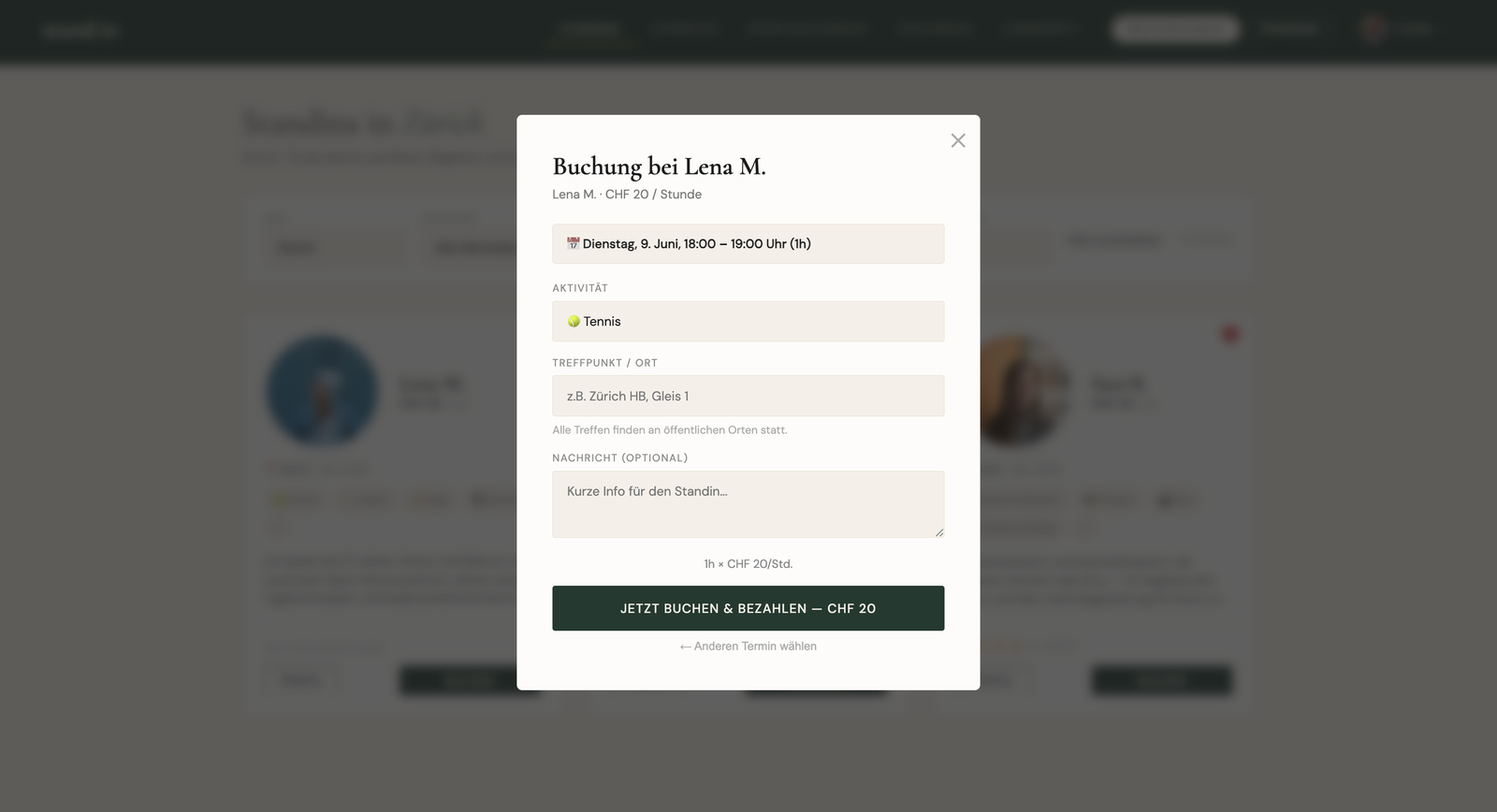
The customer first sees all of a companion's available dates, then picks one of the activities the companion offers, gives a public meeting point and can add an optional message (which becomes the first message in the chat). Before any money moves, the create-checkout edge function re-checks server-side that the slot is still free (never trusting the browser) and opens a Stripe Checkout session that carries the whole booking in its metadata.
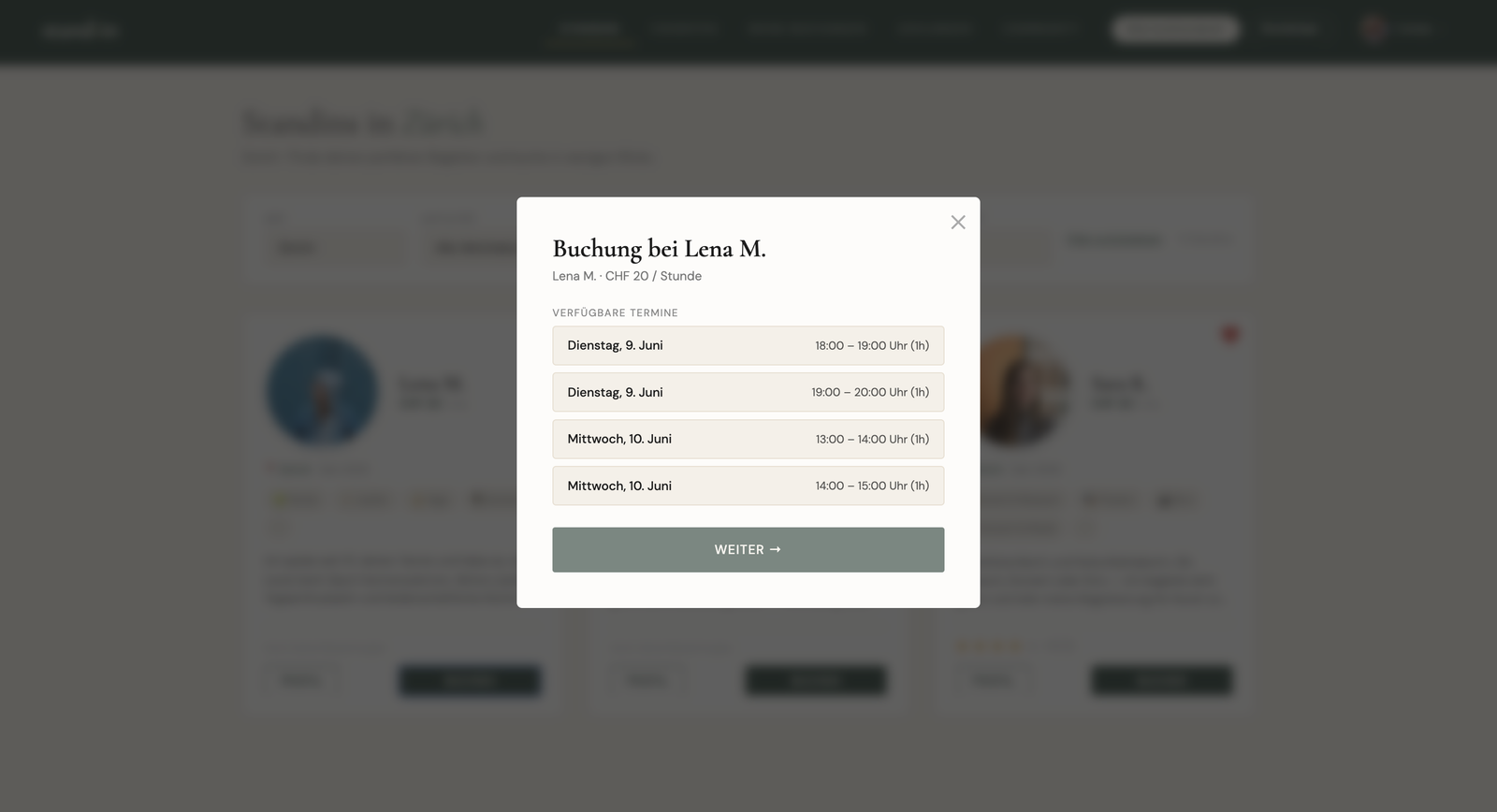
Step 1: pick an available slot1
Step 2: choose activity, meeting point and optional message2
create-checkout/index.ts
const { data: { user } } = await supabase.auth.getUser()
if (!user) return json({ error: "Nicht eingeloggt" }, 401)

// re-check the slot server-side, never trust the client
const { data: slot } = await admin
  .from("availability").select("is_booked")
  .eq("id", availability_id).single()
if (slot?.is_booked)
  return json({ error: "Termin nicht mehr verfügbar." }, 409)

// open Stripe Checkout via the REST API, no SDK
const res = await fetch("https://api.stripe.com/v1/checkout/sessions", {
  method: "POST",
  headers: { Authorization: `Bearer ${STRIPE_SECRET_KEY}` },
  body: params, // price + booking metadata
})
return json({ url: (await res.json()).url })
Feature · Confirmation Customer

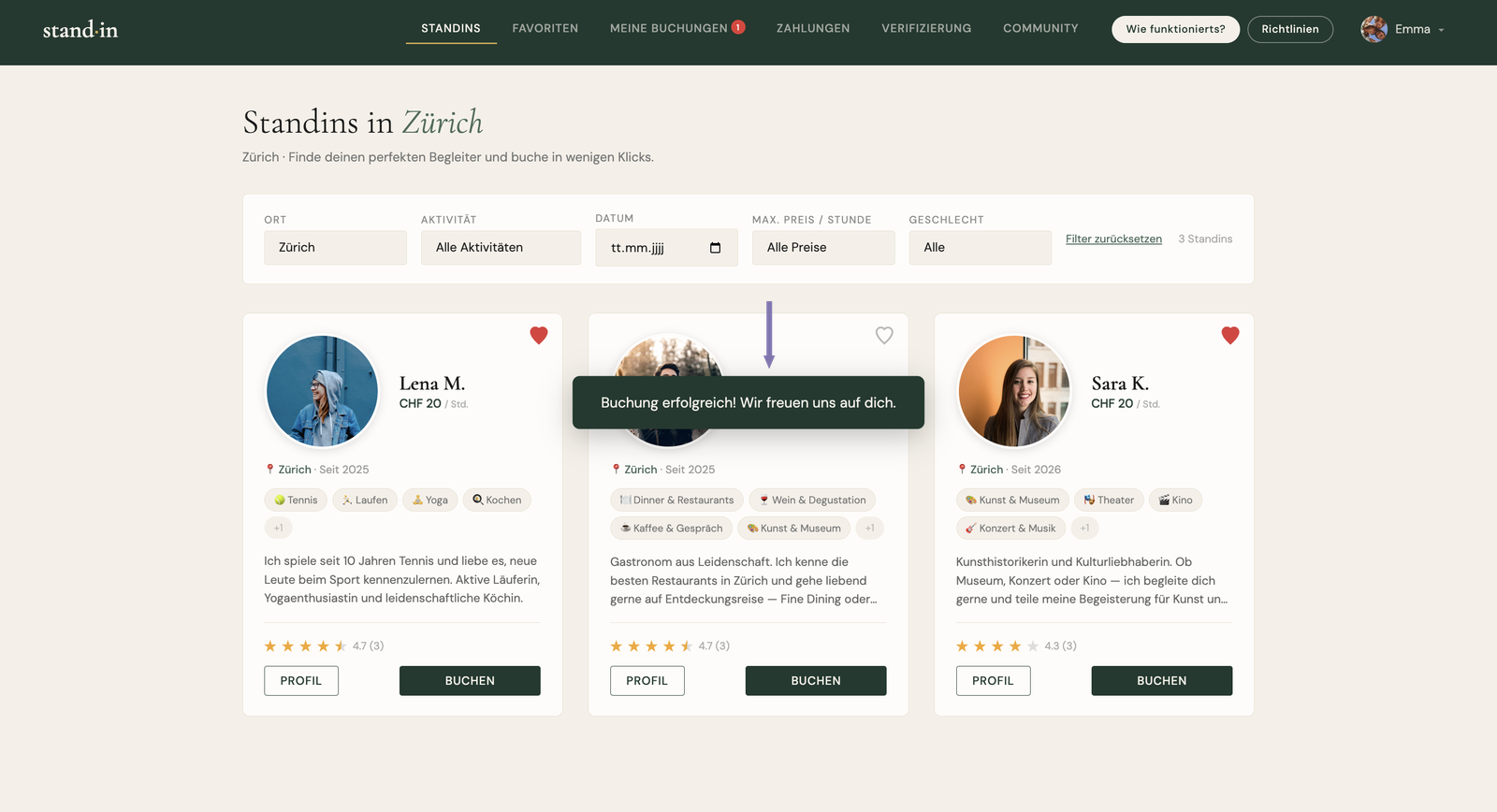
The booking is never written when the user clicks “pay”, only when Stripe's signed webhook reports the payment as complete. The Stripe session id makes it idempotent, so a replayed event can't create a second booking.

In-app booking confirmation: success toast after payment
stripe-webhook/index.ts
// signature already verified above
if (event.type !== "checkout.session.completed") return json({ received: true })
const session = event.data.object
if (session.payment_status !== "paid") return json({ received: true })

// idempotent: one Stripe session → at most one booking
const { data: existing } = await admin
  .from("bookings").select("id")
  .eq("stripe_session_id", session.id).maybeSingle()
if (existing) return json({ received: true })

await admin.from("bookings").insert({
  ...session.metadata,
  stripe_session_id: session.id,
  status: "confirmed",
})
Feature · Cancellation Customer

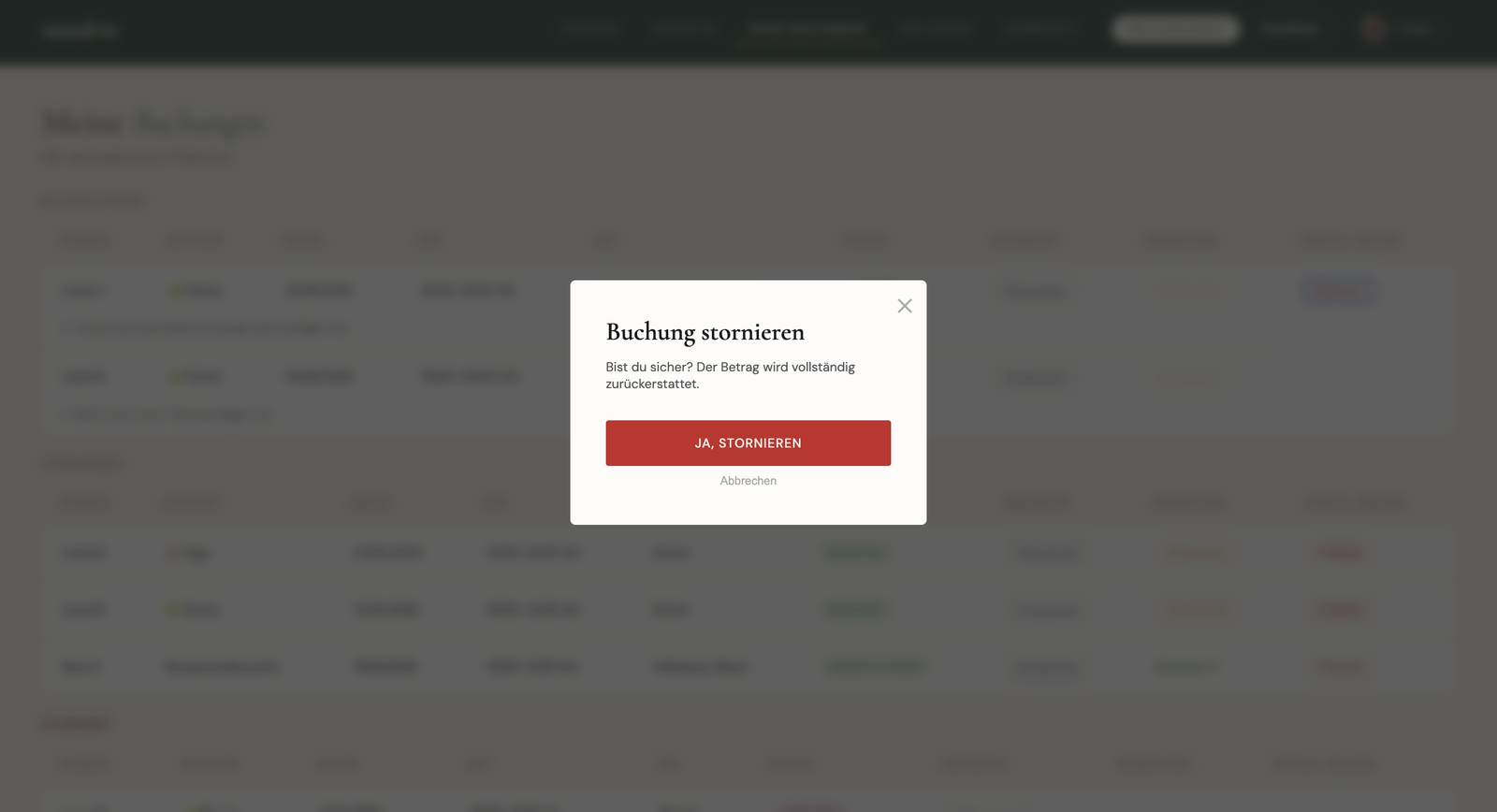
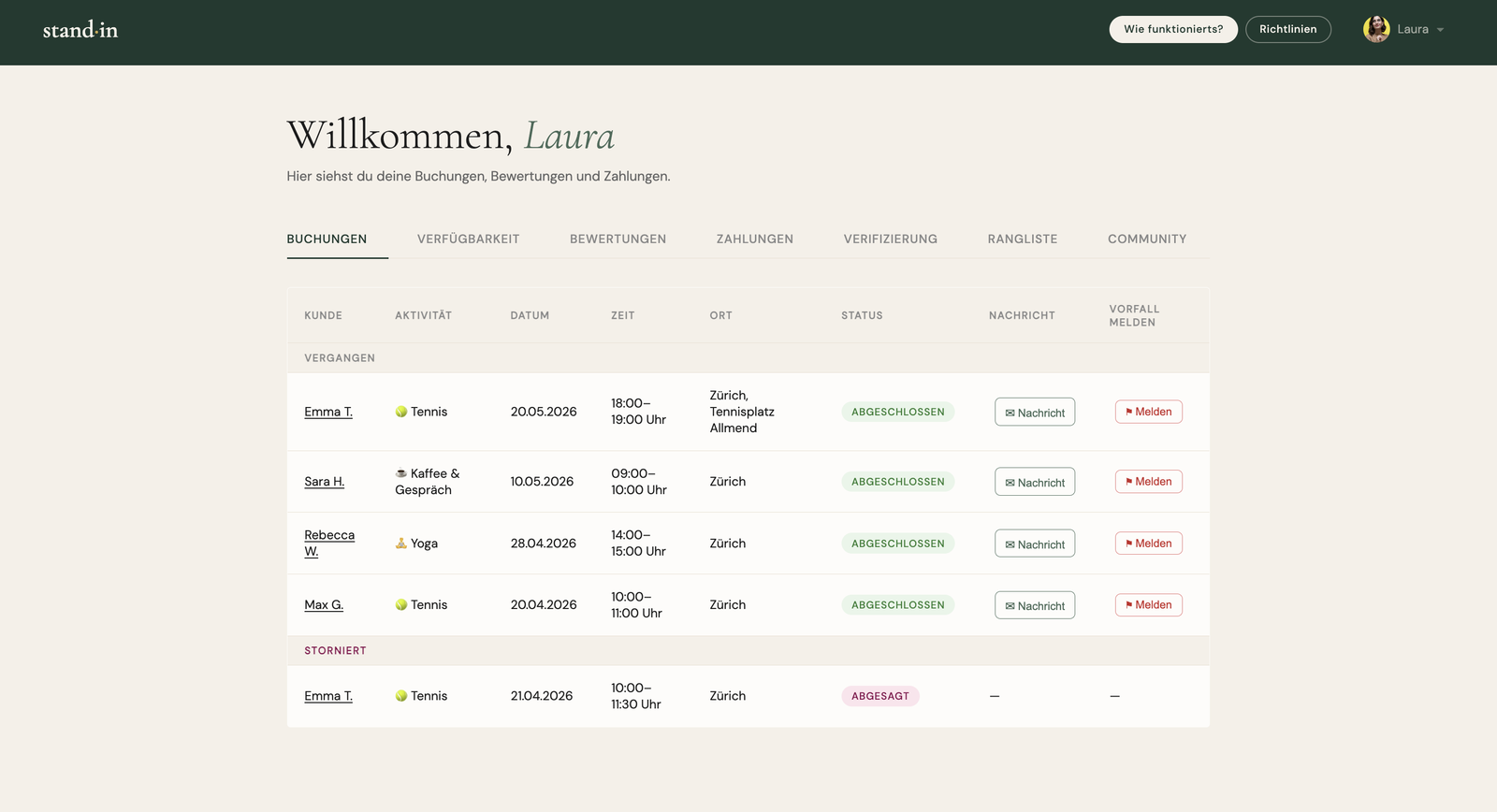
A customer can only ever load their own booking: row-level security enforces that at the database. Cancellation is allowed up to 24 hours before the slot; inside that window the request is refused with a clear message. When a booking is cancelled the standin is notified by email.

Cancel a booking
cancel-booking/index.ts
// RLS: the customer can only read their own booking
const { data: booking } = await userClient
  .from("bookings").select("status, date, time, stripe_session_id")
  .eq("id", booking_id).single()

// only cancellable up to 24h before the slot
const start = new Date(`${booking.date}T${booking.time}`)
const hoursUntil = (start.getTime() - Date.now()) / 3_600_000
if (hoursUntil < 24)
  return json({ error: "Stornierung nur bis 24 Stunden vorher möglich." }, 400)

// refund via Stripe, then free the slot again
await refundPayment(booking.stripe_session_id)
Feature · Messaging Both

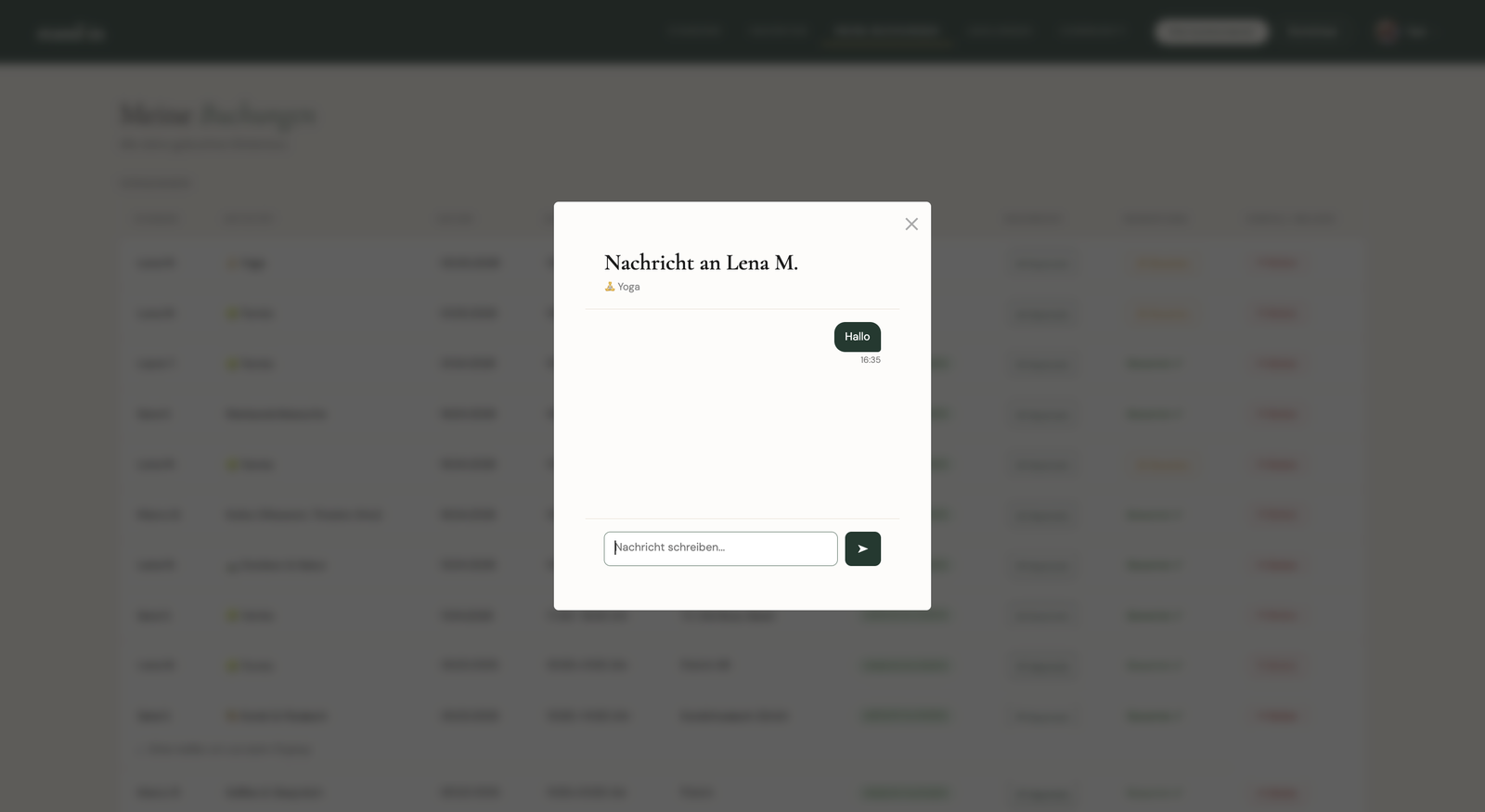
A messaging function so the customer and the companion can write to each other before and during the meeting. That way they never have to swap a phone number or email: privacy stays protected and everything happens inside the app. They can clear up any open questions ("do I need to bring anything?") or reach each other if they can't find one another, and it's a good way to get in touch before the meeting. When booking, the customer can add a message, and it shows up as the first message in the chat, and the companion is notified right away.

In-app chat between customer and companion
standins.html · chat
// the remark added at checkout shows up as the first message
if (booking?.message)
  renderBubble(booking.message, "Bemerkung zur Buchung")

// the thread is scoped to one booking, only its two
// participants (sender + receiver) can read it
const { data: msgs } = await supabase
  .from("messages").select("*")
  .eq("booking_id", chatBookingId)
  .order("created_at", { ascending: true })

// sending a new message
await supabase.from("messages").insert({
  booking_id: chatBookingId,
  sender_id: currentUser.id,
  receiver_id: chatReceiverId,
  content,
})
Tooling · Live page preview Admin

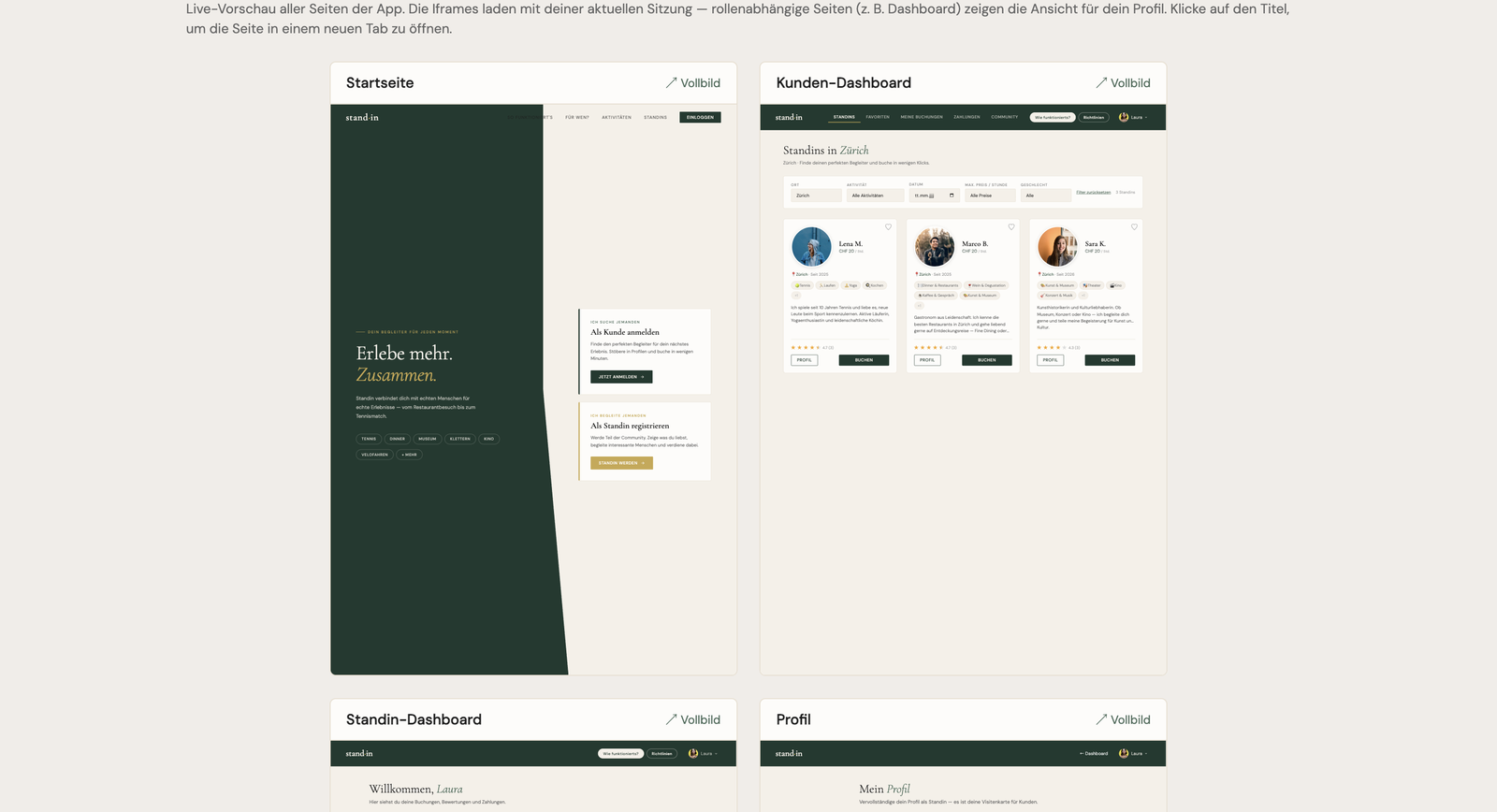
In the admin dashboard I built a live preview of every page, onboarding included. This helped most while coding: when I had to make small changes I didn't have to register as a new user over and over just to see the onboarding, or log in as a user to reach a page. I could see all the current pages at a single glance. It's one of the ideas I'm proudest of in this build: a small piece of tooling I came up with myself that paid off every single day.

Admin dashboard with a live preview grid of every app page
admin.html · renderPagesPreview()
const pages = [
  { title: "Startseite",          url: "index.html" },
  { title: "Kunden-Dashboard",    url: "standins.html" },
  { title: "Standin-Dashboard",   url: "dashboard.html" },
  { title: "Profil",              url: "profile.html" },
  { title: "Onboarding Kunde",    url: "onboarding-customer.html" },
  { title: "Onboarding Standin",  url: "onboarding-standin.html" },
]

// ?preview=1 → the page skips its usual role/auth redirects
const withPreview = u =>
  u + (u.includes("?") ? "&" : "?") + "preview=1"

// desktop-sized iframe, scaled down so a whole page fits a card
const SCALE = 0.32, FRAME_W = 1280, FRAME_H = 1800
Feature · Profile data Both

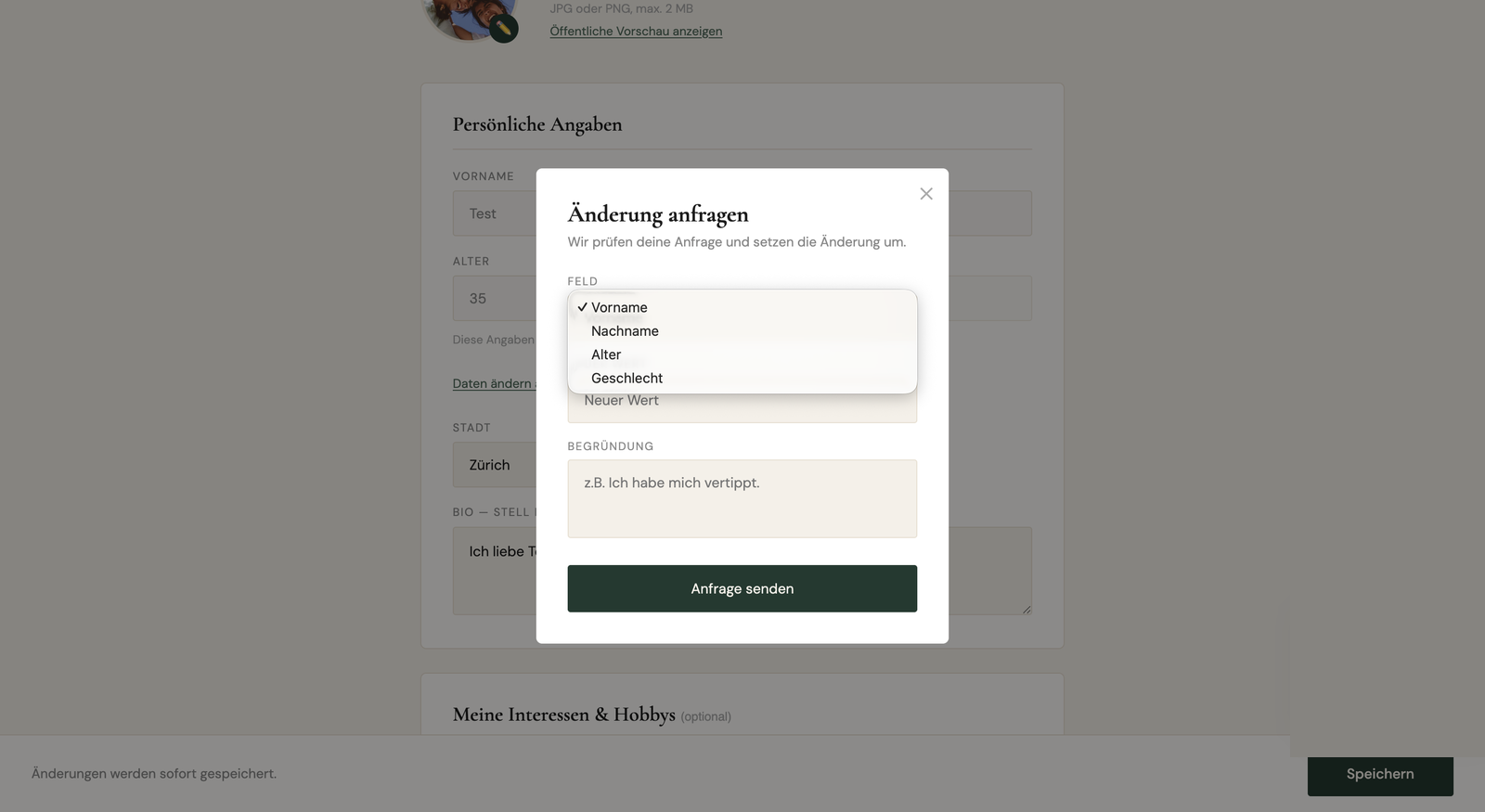
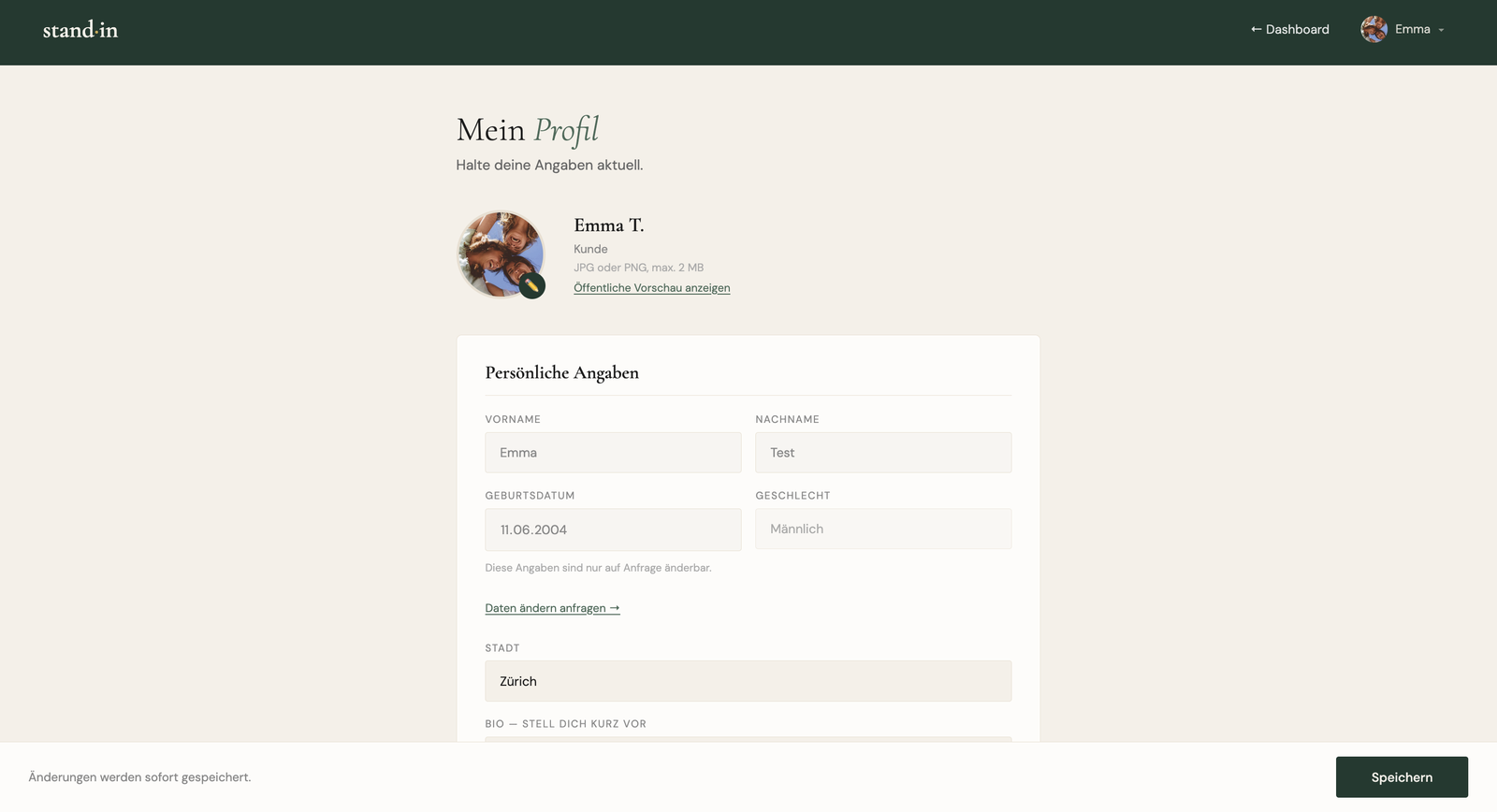
To keep both customers and companions safe, I made it so the core profile data (name, age and gender) can't be changed freely, only on request. So I built a feature where you can request a change to, for example, your name, together with a reason. We review the request and then carry out the change.

Profile change-request modal with a field picker and a reason
profile.html · submitChangeRequest()
// name, age and gender aren't editable inline,
// the user picks a field and gives a reason instead
if (!newValue) return showError("Bitte neuen Wert angeben.")
if (!reason)   return showError("Bitte Begründung angeben.")

// age is bounded: standins 20+, customers 18+
if (field === "age") {
  const min = profile.role === "standin" ? 20 : 18
  if (+newValue < min || +newValue > 99) return showError(…)
}

// nothing changes yet, it's filed for review
await supabase.from("profile_change_requests").insert({
  user_id: currentUser.id,
  field_name: field,   // first_name · last_name · age · gender
  new_value: newValue,
  reason,
})
Feature · Transparency Companion

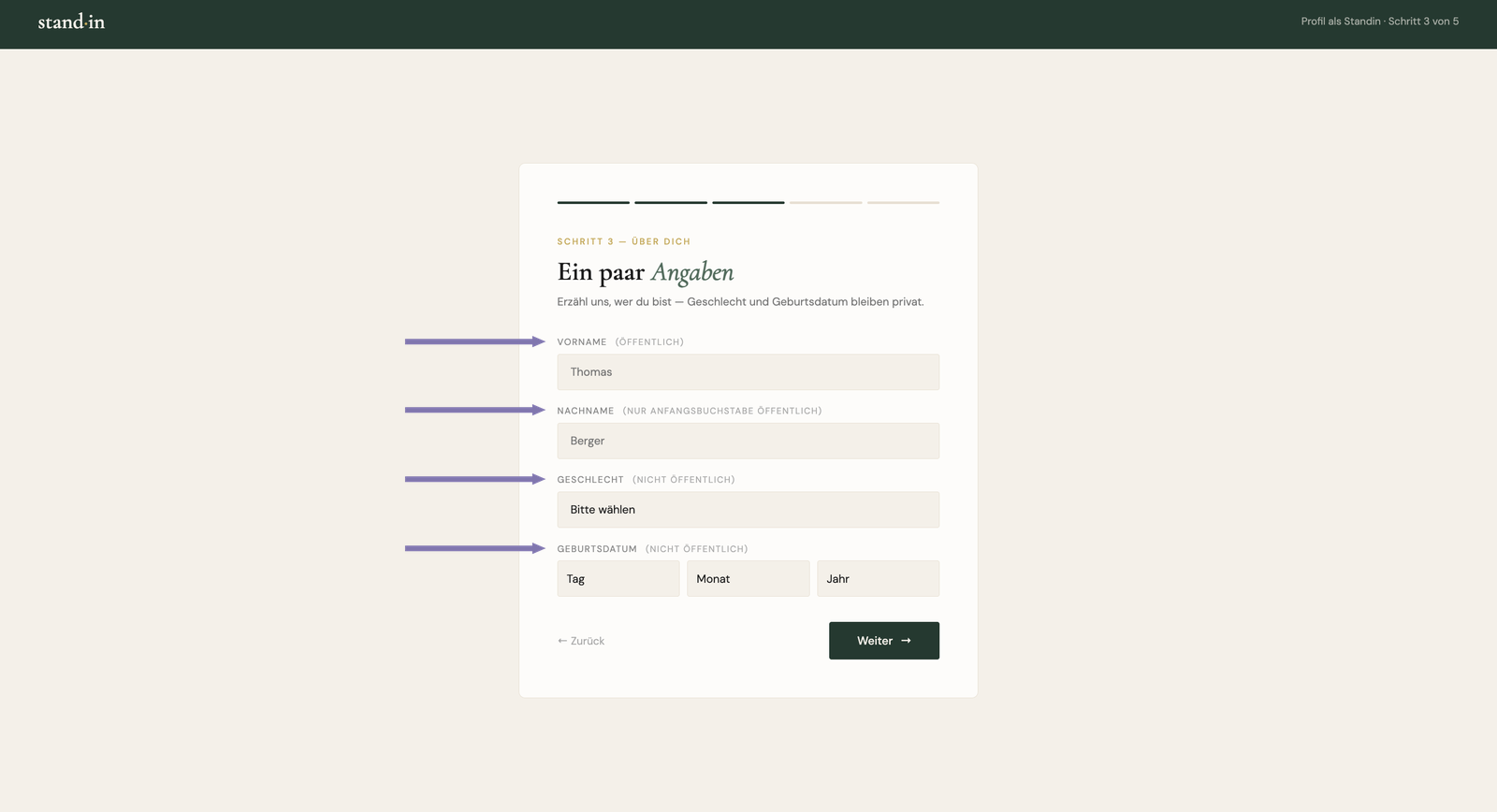
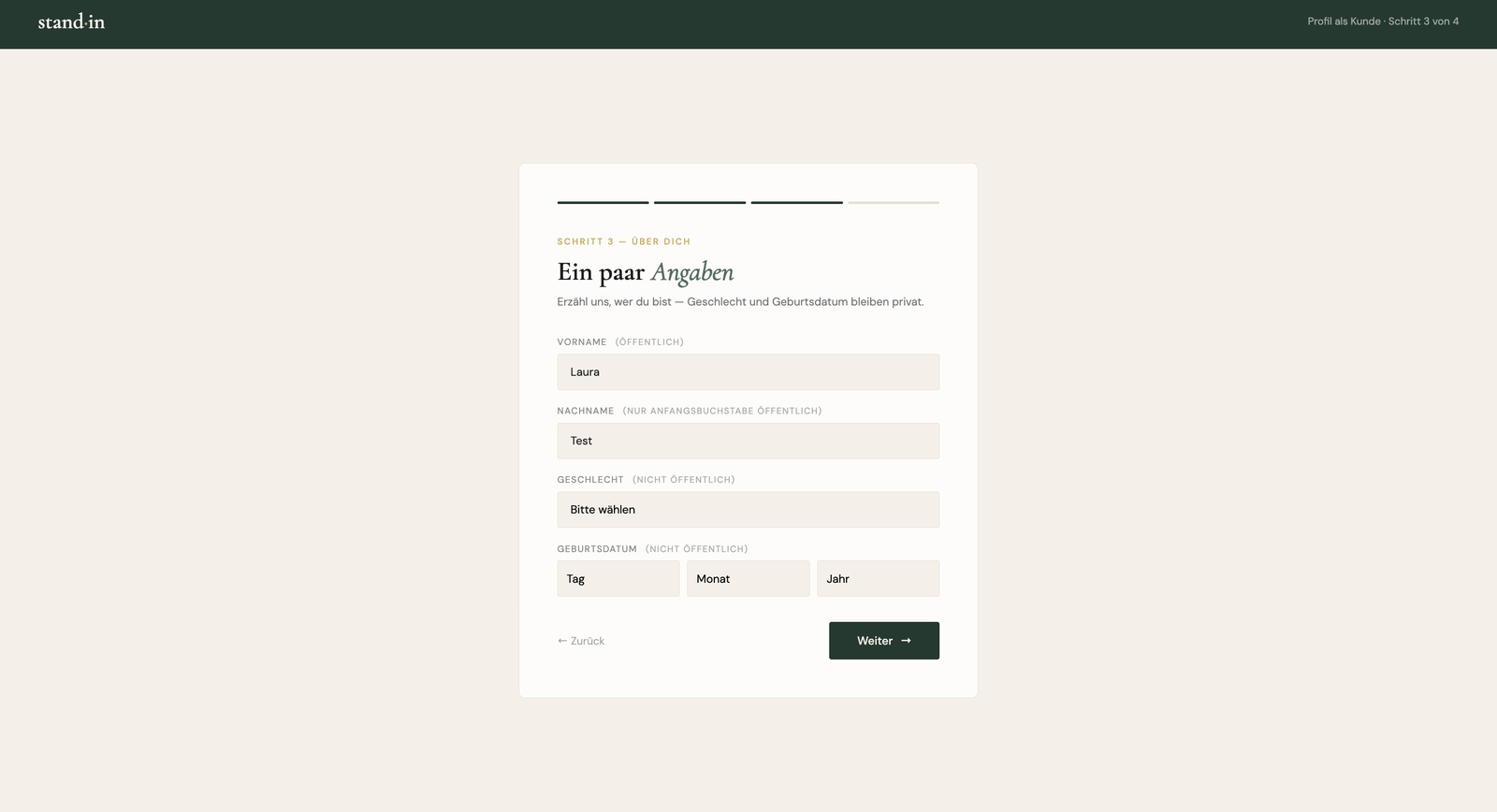
Right in the onboarding I make it explicit which details are shown publicly and which are only used internally: every field is labelled. The first name is public, only the first letter of the surname is shown, and gender and date of birth stay private. This gives the user a feeling of security: they know exactly what happens with their data, which lowers the hurdle to signing up.

Standin onboarding: each field labelled public or private
onboarding-standin.html · about you
<!-- every field says how visible it is -->
<label>Vorname (öffentlich)</label>
<label>Nachname (nur Anfangsbuchstabe öffentlich)</label>
<label>Geschlecht (nicht öffentlich)</label>
<label>Geburtsdatum (nicht öffentlich)</label>

// gender + birthdate are stored, but never rendered publicly
await _supabase.from("profiles").update({
  first_name: firstName, last_name: lastName,
  gender, birthdate, age,             // private, internal use only
}).eq("id", currentUser.id)
Feature · Matching Companion

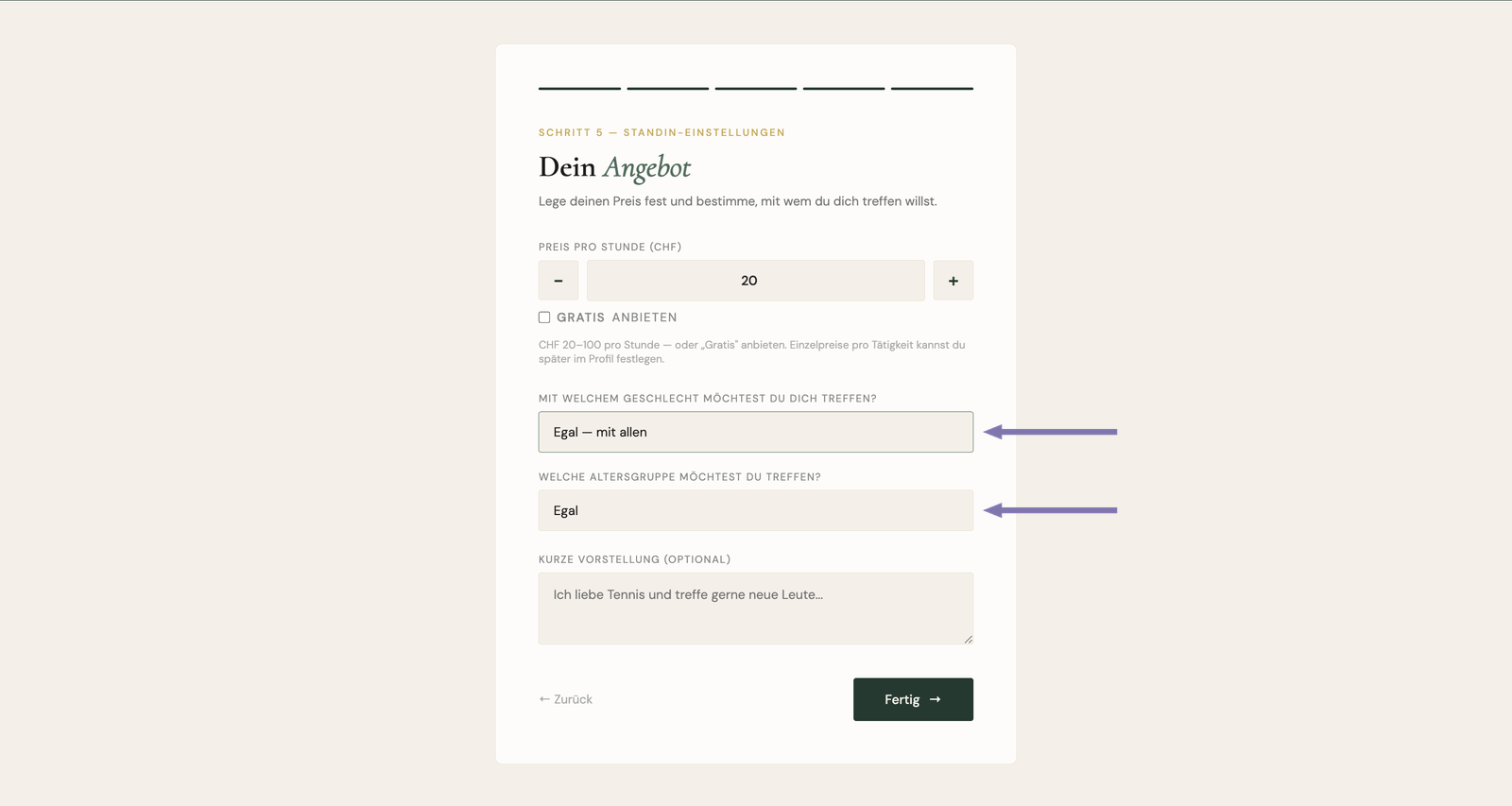
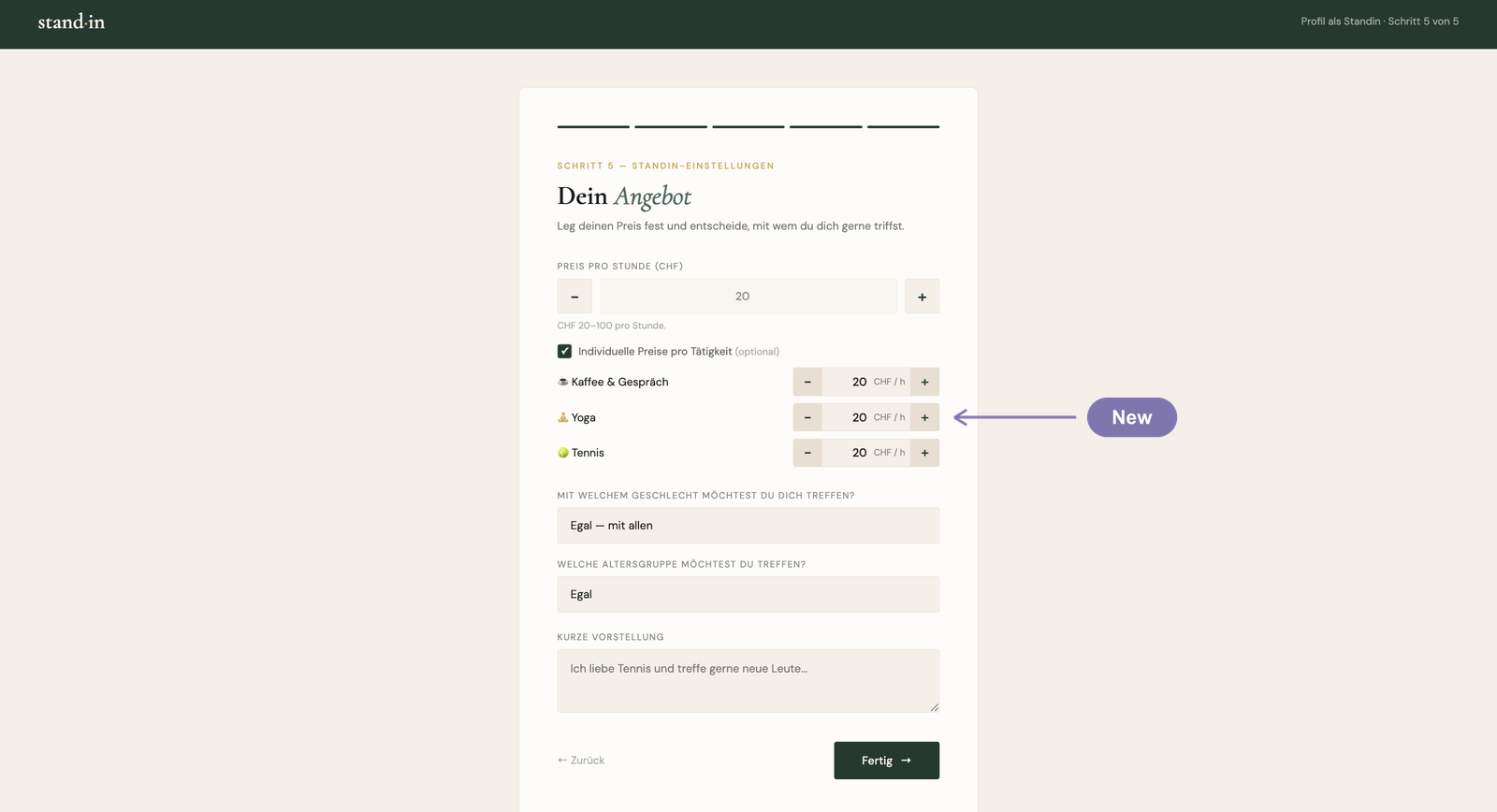
Everyone (companions and customers alike) has to give their age at sign-up, but it's never shown publicly. I kept it hidden on purpose: otherwise the platform slips into dating-app territory, and when you meet people in real life who become friends you don't ask their age first either. To keep companions safe, though, they can choose which gender they want to accompany and in which age range. They're then only shown to the customers who match, so they stay in control and feel safe.

Standin preferences: choose which gender and age range to accompany
standins.html · matching
// age is collected at sign-up, but never shown publicly

// a standin only appears to the customers they want to meet
filtered = filtered.filter(s => {
  const genderPref = s.client_gender_pref ?? "beide"
  if (genderPref !== "beide" && custGender && genderPref !== custGender)
    return false
  if (!inAgeRange(custAge, s.client_age_pref)) return false
  return true
})

function inAgeRange(age, range) {
  if (!range || range === "egal") return true
  const [min, max] = range.split("-").map(Number)
  return age >= min && age <= max
}
Feature · Availability Companion

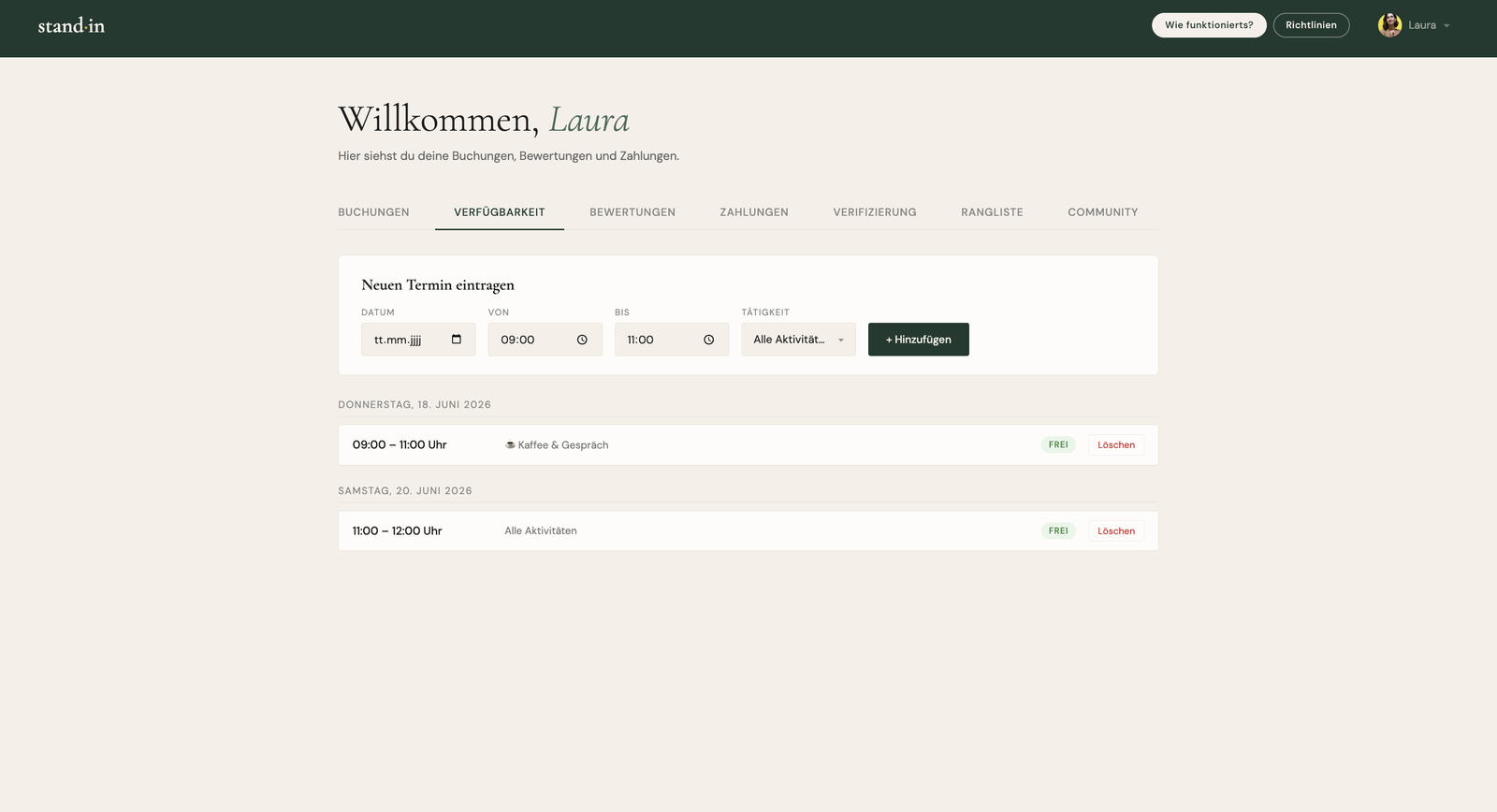
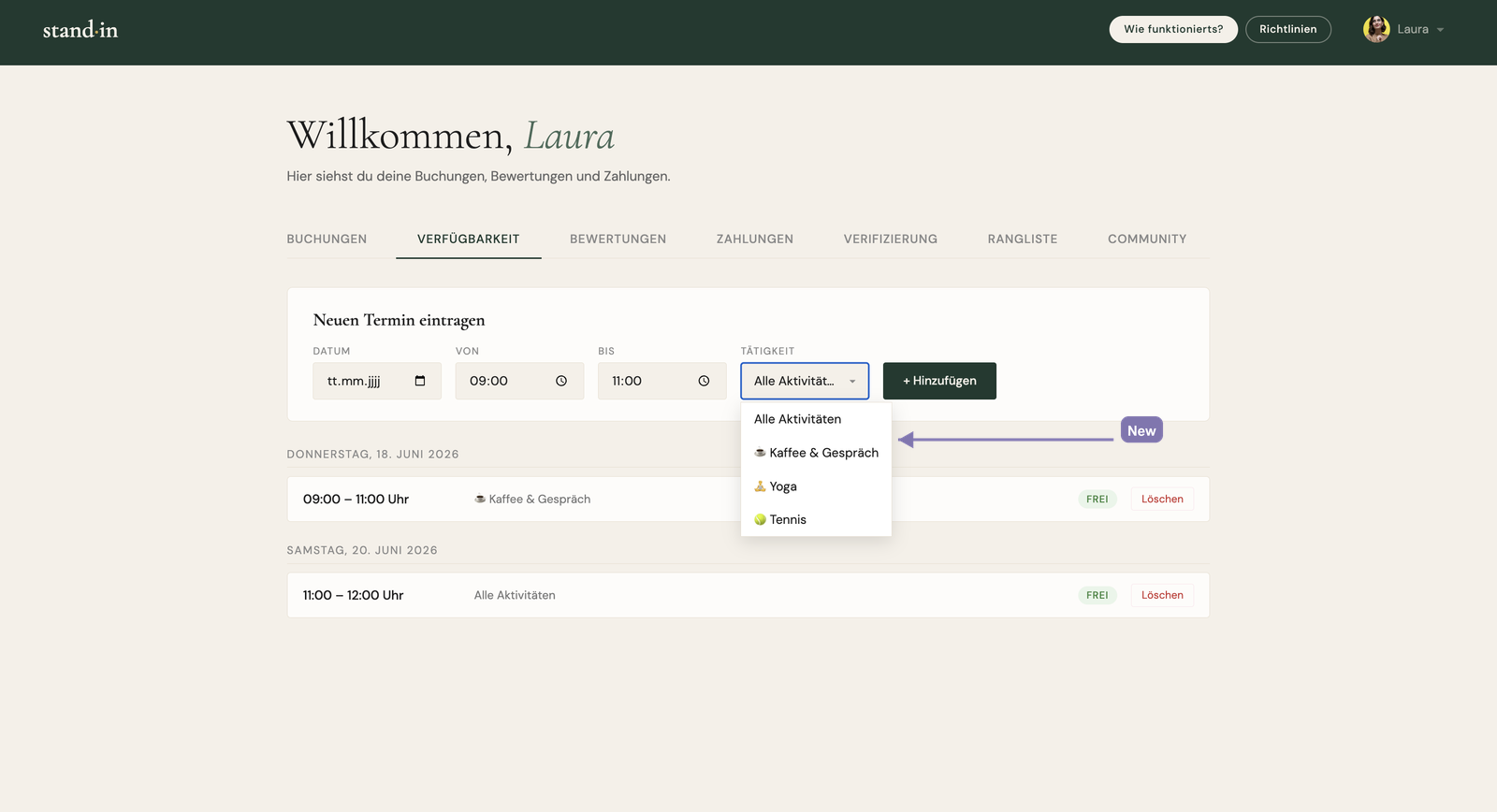
In the standin dashboard I built a calendar where companions enter the slots they're available for in advance, so customers can book them. A slot has to start at least 4 hours from now to be bookable, which leaves both sides enough lead time to prepare. As long as a slot hasn't been booked yet, the companion can delete it again, which gives them a clean overview of everything they've entered. Once a slot is booked it's binding.

Standin dashboard availability calendar with free and booked slots
dashboard.html · availability
// companion adds a free slot, only fixed 1–3h durations
const allowed = [60, 90, 120, 150, 180]  // minutes
if (!allowed.includes(duration)) return showAvailMsg("Nur 1–3h.")

await supabase.from("availability").insert({
  standin_id: currentUser.id, date, time_start, time_end,
})

// the list shows each slot as Frei / Gebucht, a delete
// button appears only while it's still free and not past
if (!slot.is_booked && !isPast) renderDeleteButton(slot.id)

async function deleteSlot(id) {
  await supabase.from("availability").delete().eq("id", id)
}
Feature · Reporting Both

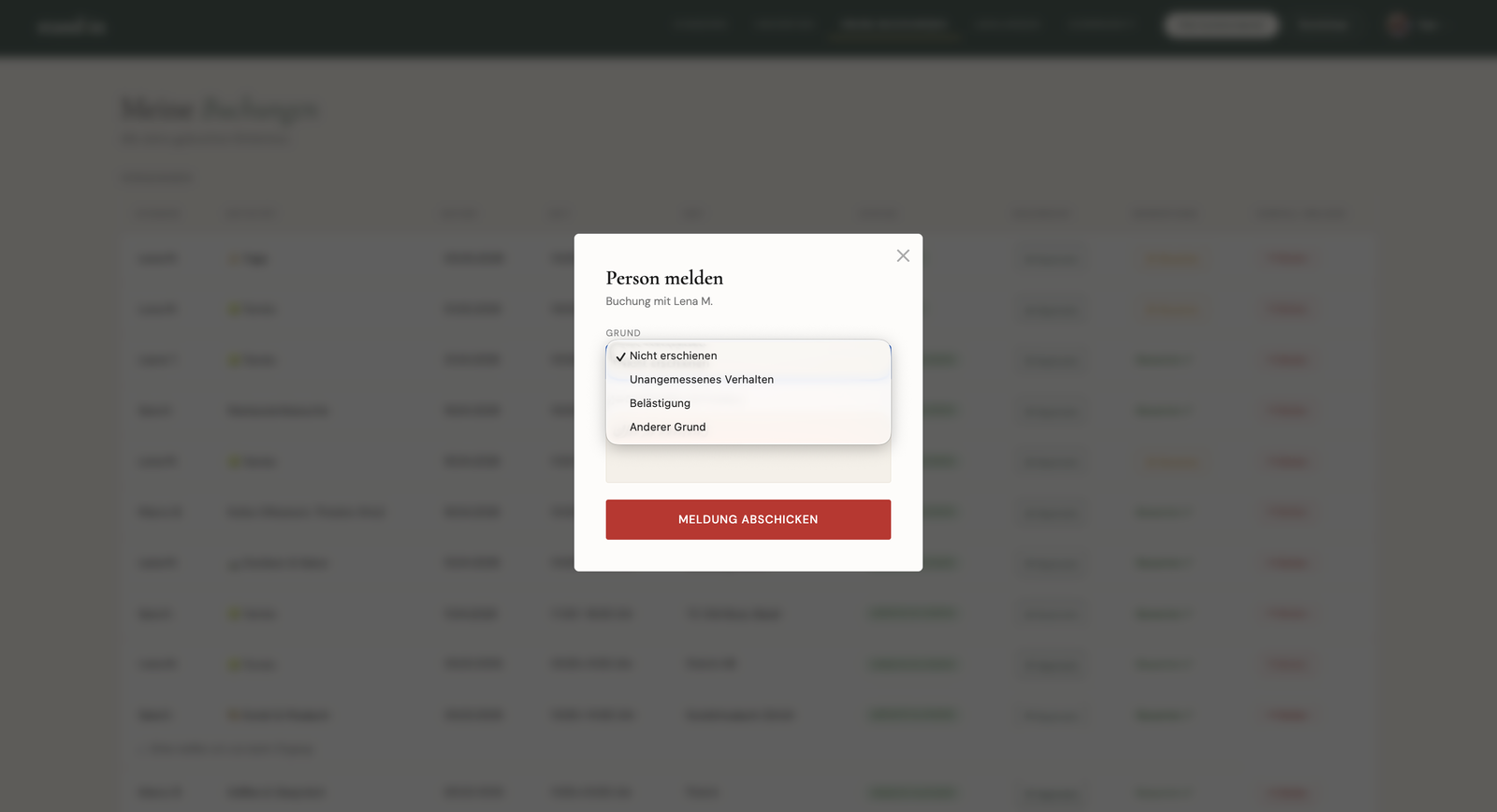
On a platform where strangers meet, this is really important. To protect the community (customers and companions alike), I built a report function: any user can report someone they've met, with a reason (no-show, inappropriate behaviour, harassment, or something else) and an optional description. The report lands with the admin, who can look into it and, if needed, ban the user, so anyone who breaks the guidelines is removed from the platform.

Report-a-user modal with a reason dropdown and optional description
standins.html · submitReport()
// reasons: no_show · inappropriate · harassment · other
const reason  = reportReason.value
const message = reportMessage.value.trim()  // optional

await supabase.from("reports").insert({
  reporter_id: currentUser.id,
  reported_id: reportedId,
  booking_id:  bookingId || null,
  reason,
  message: message || null,
})

// the admin is notified and can review, and ban if needed
await supabase.functions.invoke("send-email", {
  body: { type: "new_report", report: { reason } },
})
Feature · Community Both

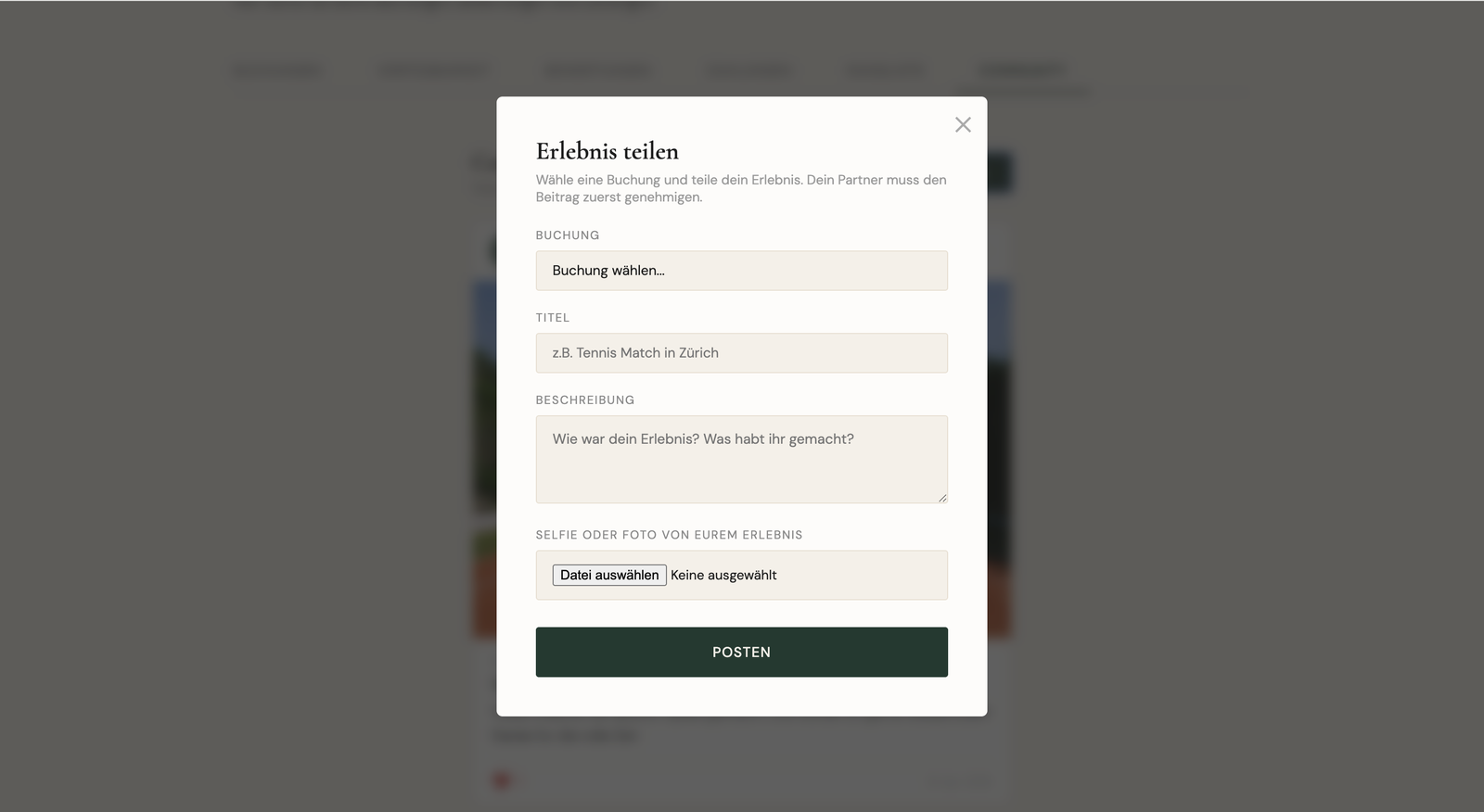
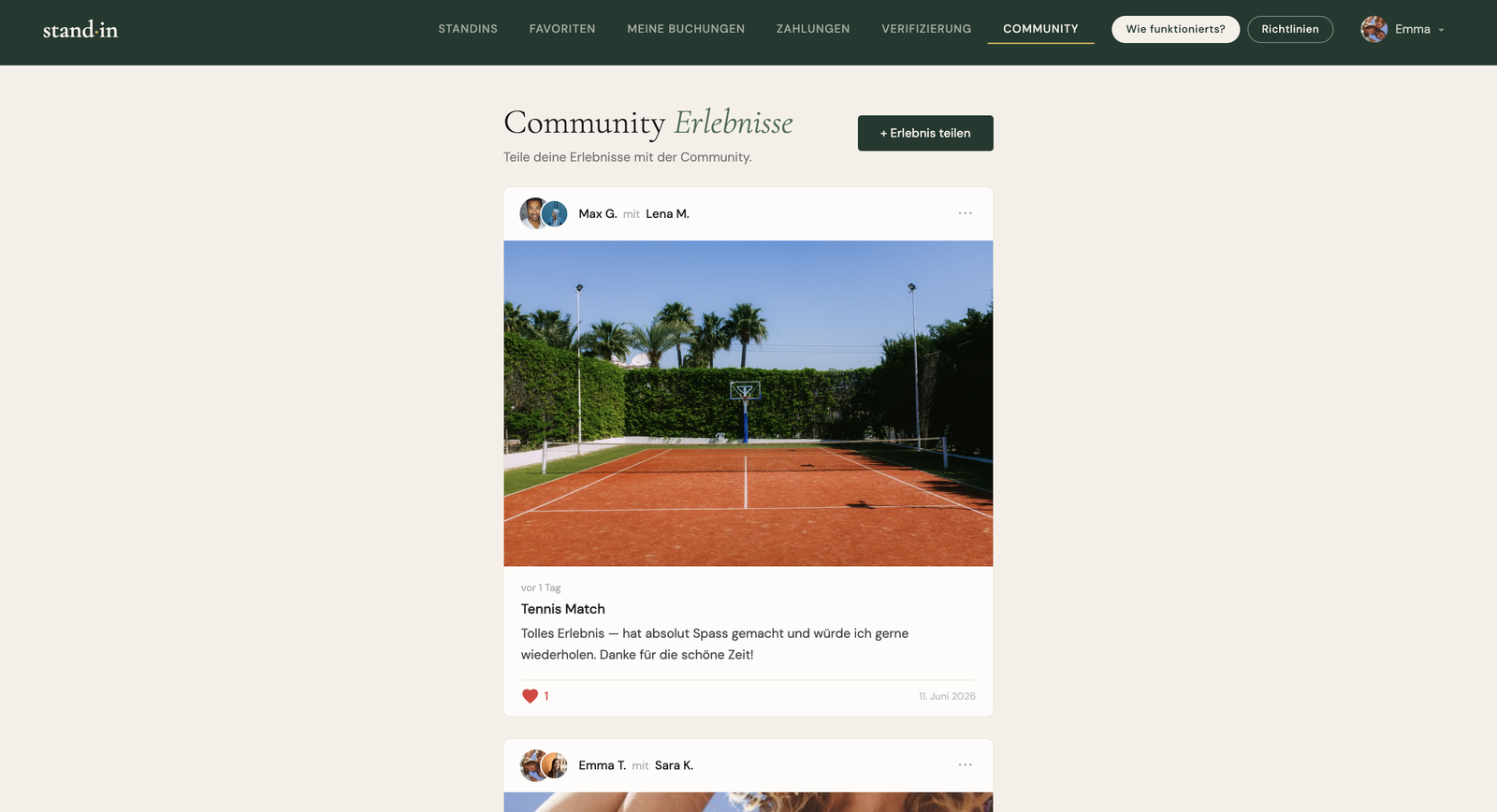
A community feature where a standin or a customer can post about a meeting they had together, with a selfie or a photo of the location. Either person can write a post about any of their past experiences. But it only goes public once the other person involved agrees, so nobody is shown without their consent.

Share-a-post modal: pick a booking, add title, description and a photo
standins.html · community
// either participant can post about a past booking
await supabase.from("community_posts").insert({
  user_id: currentUser.id,
  partner_id: booking.standin_id,
  booking_id: booking.id,
  title, description, image_url,
  approved: false,   // private until the partner agrees
})

// only the other person can approve, then it goes public
await supabase.from("community_posts")
  .update({ approved: true })
  .eq("id", id).eq("partner_id", currentUser.id)

// the public feed shows approved posts only
supabase.from("community_posts").select("*").eq("approved", true)
Feature · Standin profile Customer

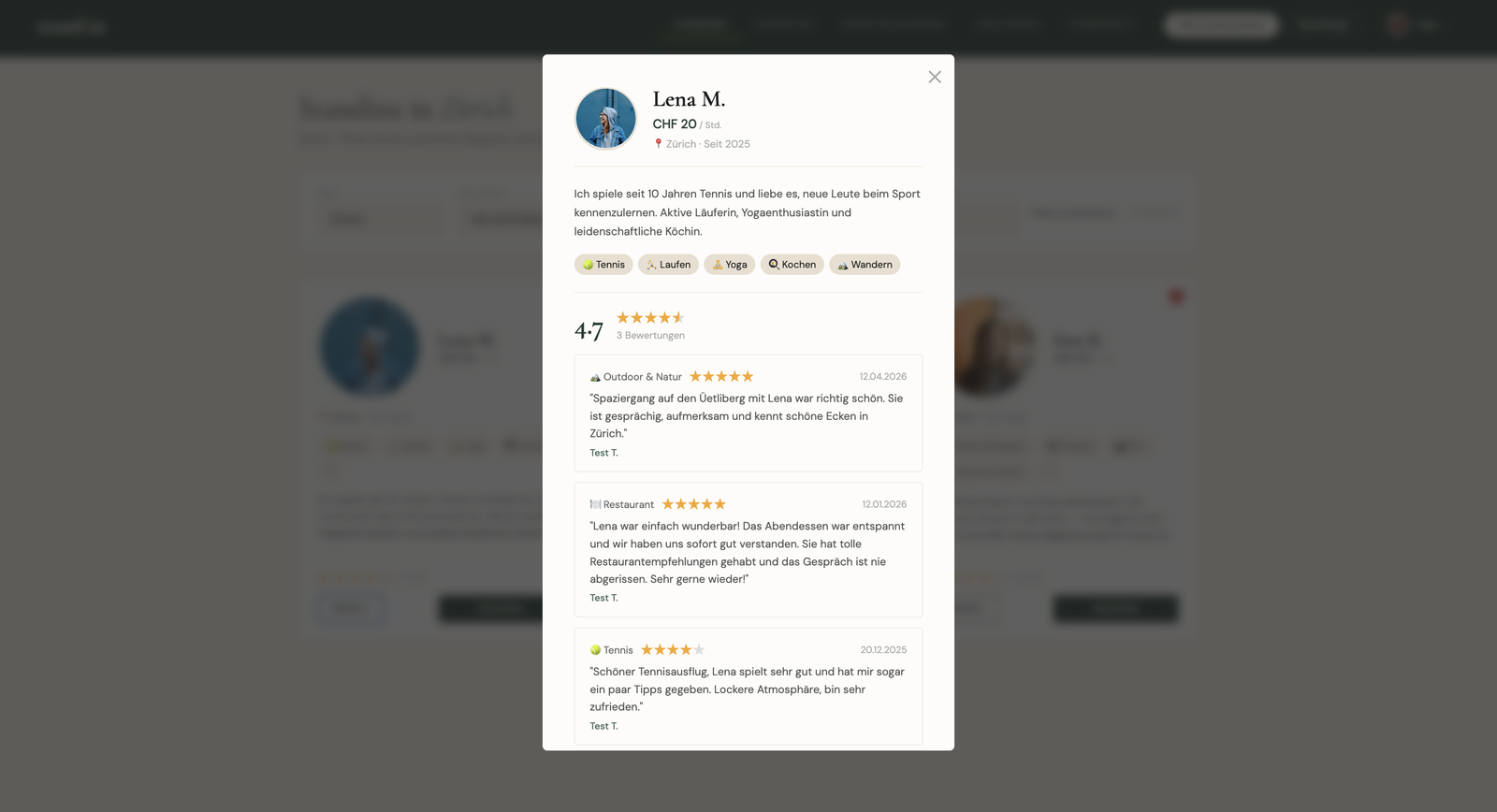
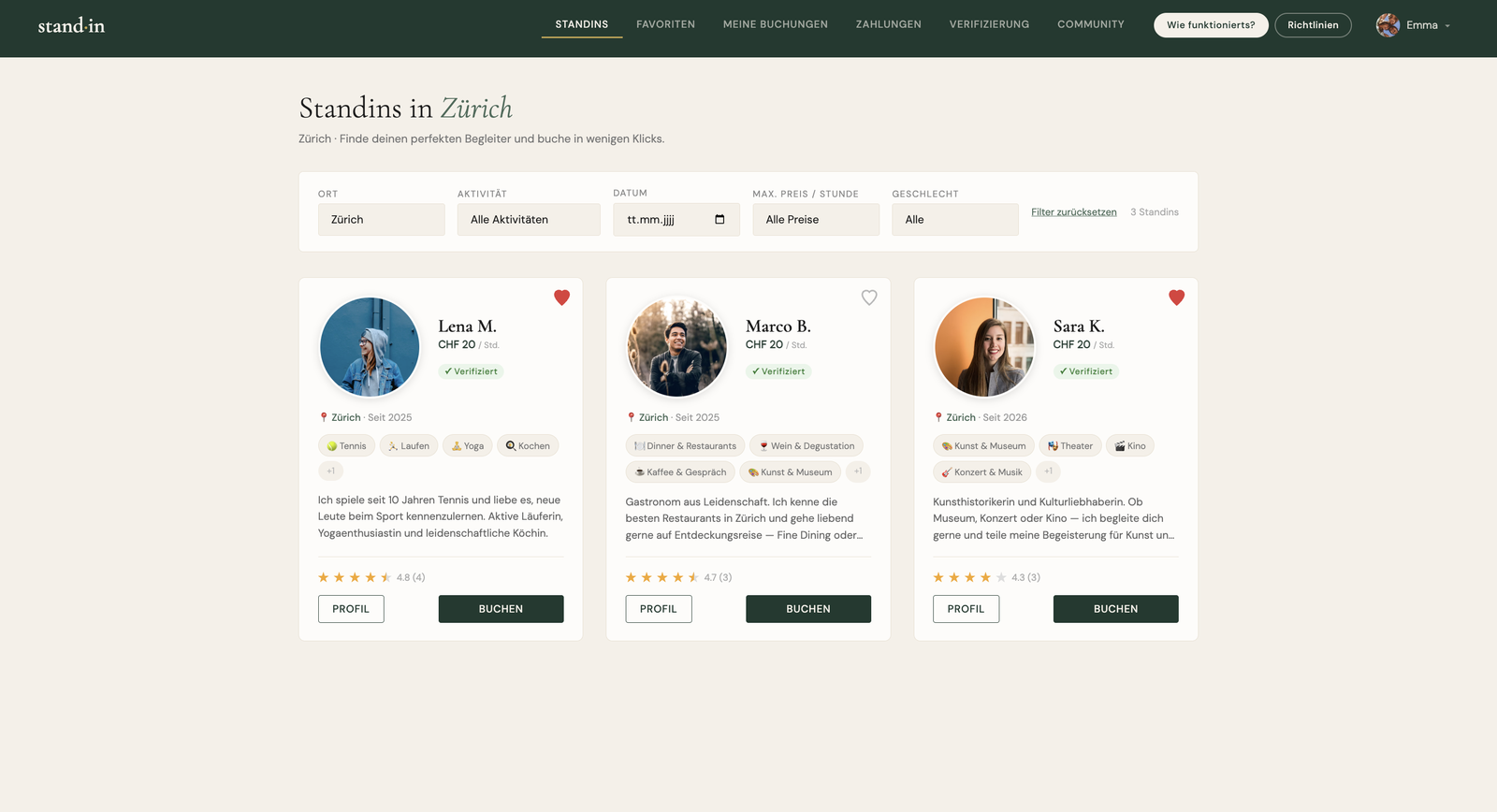
When you open a standin's profile, you see the whole profile: profile picture, price, location, a short bio, the activities they offer and whether they're verified, together with all of their reviews and the average rating.

Full standin profile with bio, activities, verified badge and reviews
standins.html · openStandinProfile()
// the full profile: bio, activities, verified badge, price …
renderHeader(s)  // avatar · name · ${s.city} · Seit ${sinceYear}

// … plus every review the standin has received
const { data: reviews } = await supabase
  .from("reviews")
  .select("rating, comment, activity, created_at, tags, reviewer:reviewer_id(first_name)")
  .eq("standin_id", standinId)

// average rating shown next to the stars
const avg = (reviews.reduce((s, r) => s + r.rating, 0) / reviews.length).toFixed(1)
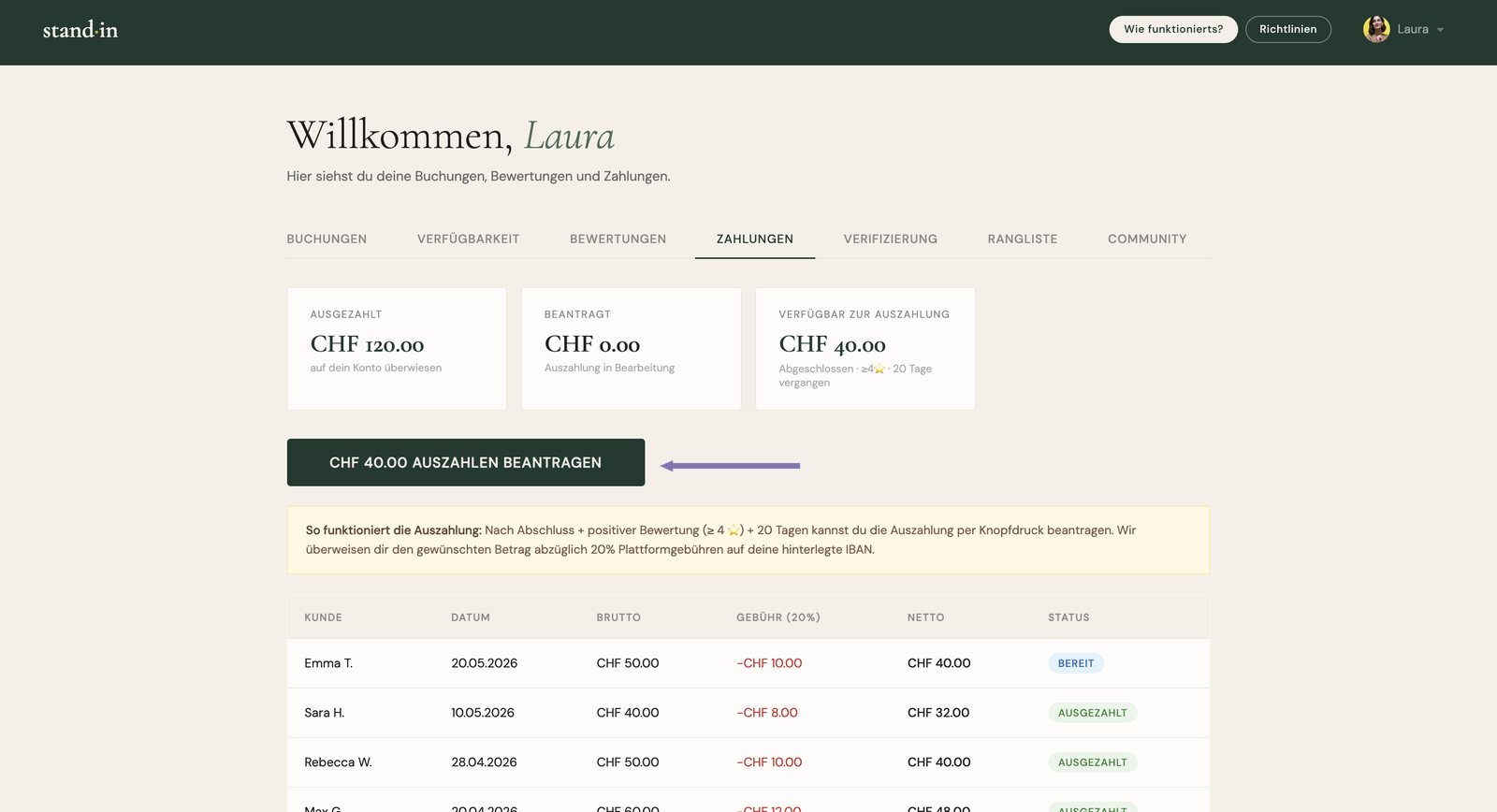
Feature · Payouts Companion

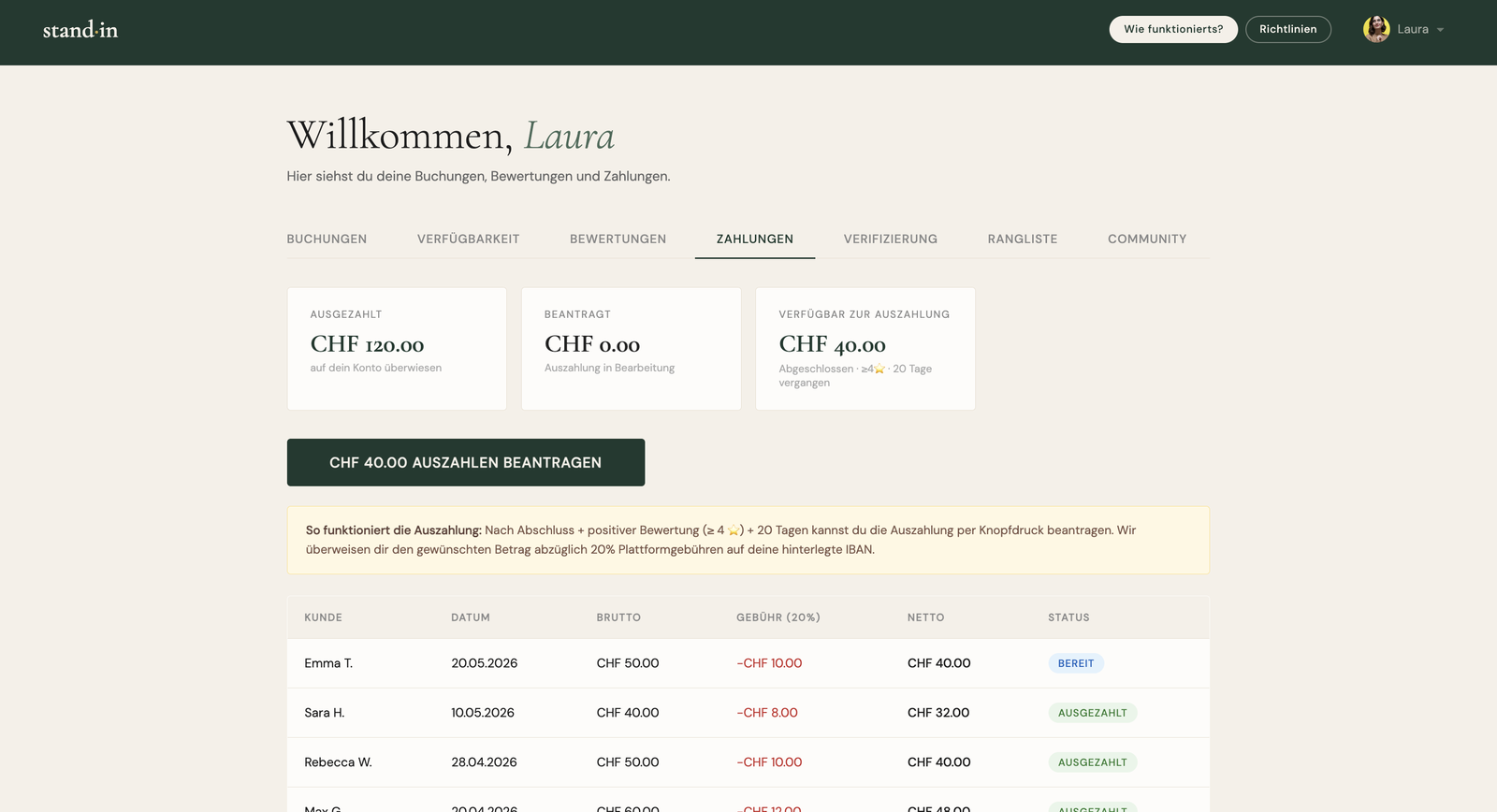
A feature where a standin can see how much they've earned across all their bookings and how much is deducted. There are three figures: the amount already paid out, the amount requested, and the amount available for payout. 20 days after a booking and a positive review (more than 4 stars), the standin can request a payout at the push of a button (for the available amount), and after we check it the money is transferred to the IBAN they provided. The advantage: the admin only has to pay out once a request is made, not continuously.

Standin payouts dashboard: paid out, requested and available amounts
dashboard.html · payouts
const PAYOUT_DAYS = 20, PLATFORM_FEE = 0.20

// a booking is payable 20 days after the date, once it has ≥4★
const eligible = bookings.filter(b =>
  (reviewMap[b.id] ?? 0) >= 4 && new Date(b.date) <= cutoff)

// three totals (net = gross − 20% platform fee)
const paid      = sum("paid")       // already paid out
const requested = sum("requested")  // awaiting transfer
const available = sum("eligible")   // ready to request

// the standin requests it, admin only pays out on request
await supabase.from("payout_requests").insert({
  standin_id: currentUser.id,
  amount_chf: available,
  iban: profile.iban,
})
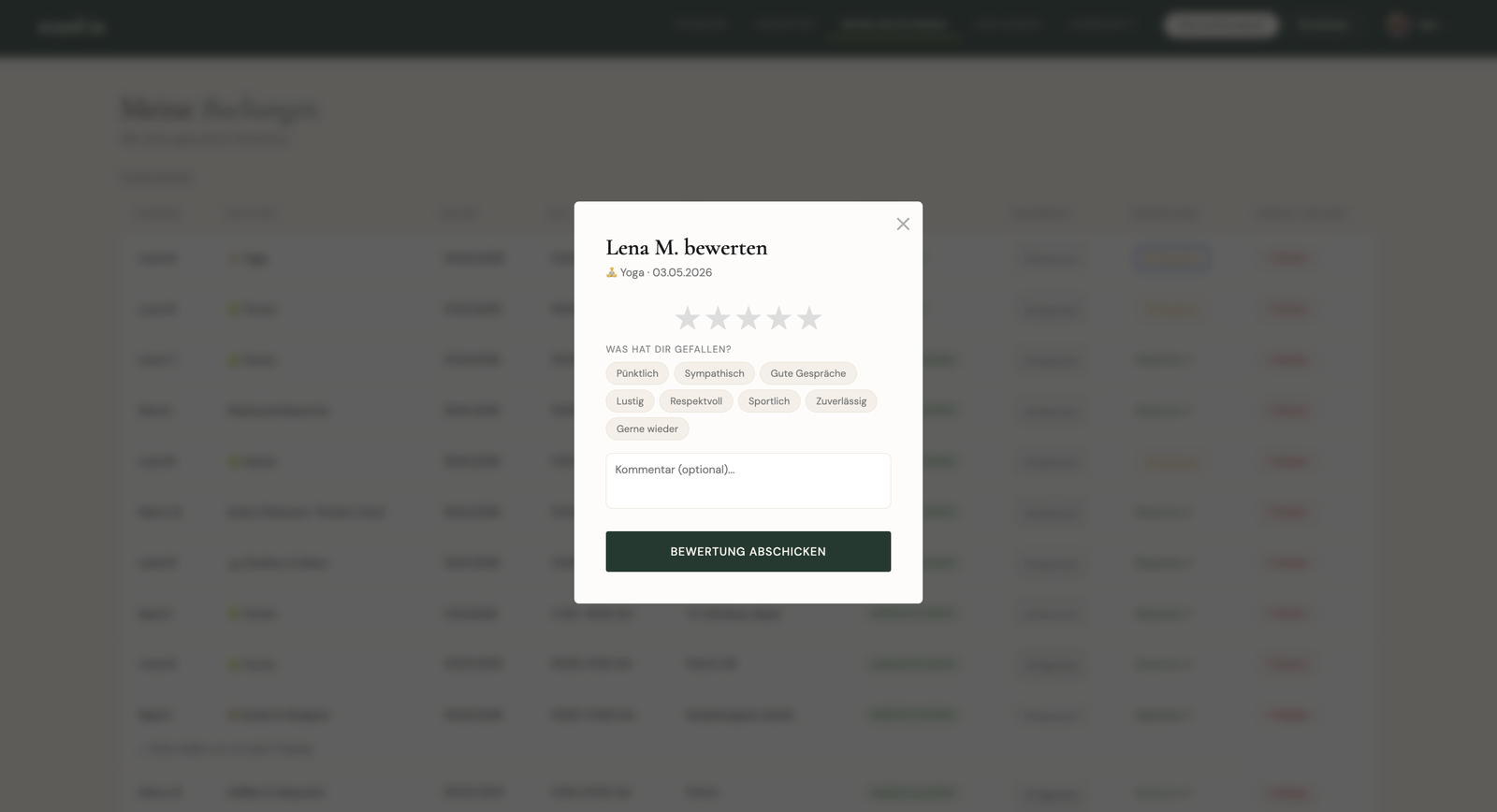
Feature · Reviews Customer

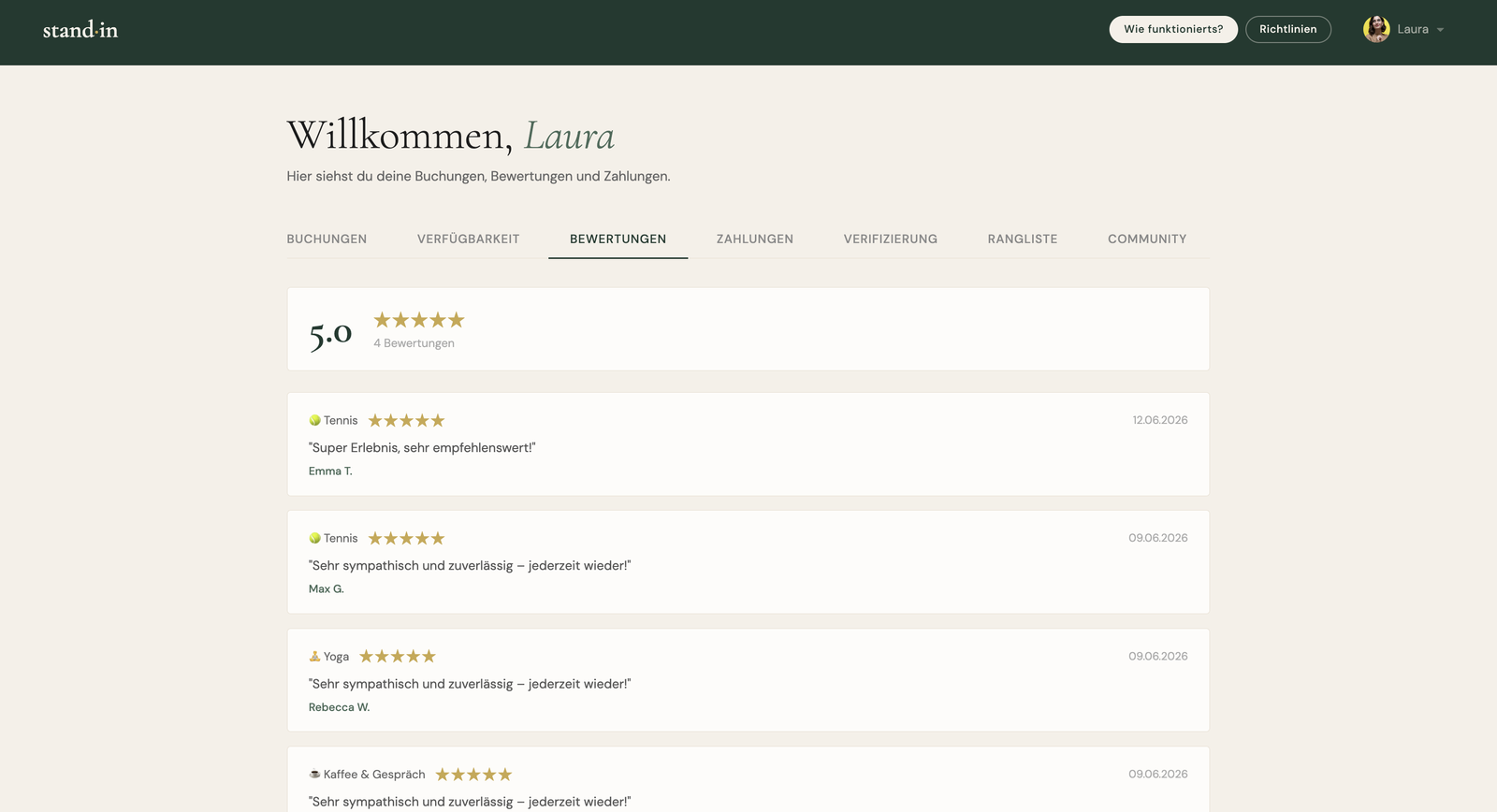
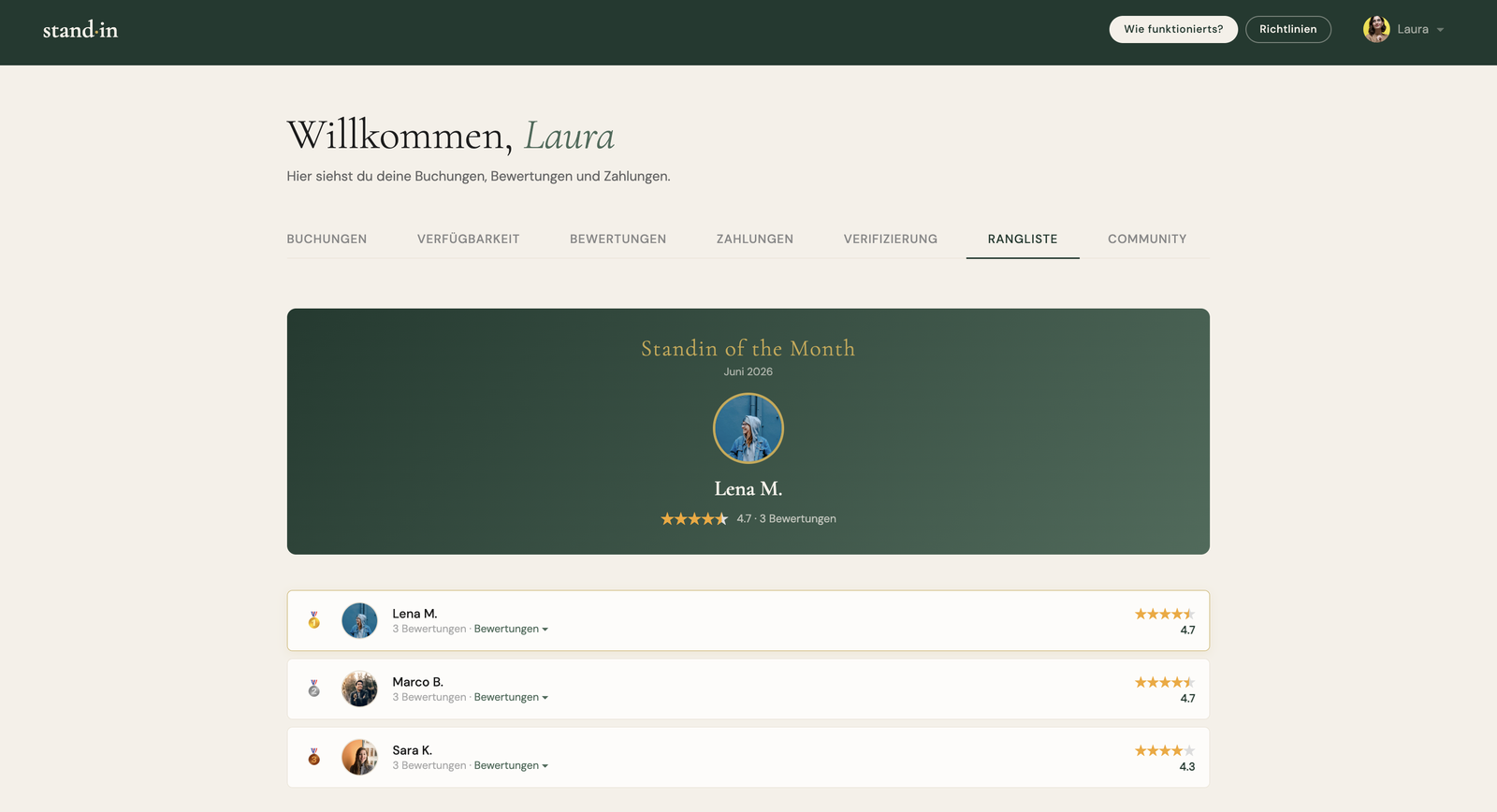
Alongside the report function, the review feature is an important part of the platform's safety. After a shared experience the customer can rate the standin: a star rating, plus keywords like "punctual", and an optional free text. This helps other customers form a picture of a standin and rewards the good ones. On top of that, standins get a ranking based on their reviews, and every month a "Standin of the Month" is crowned through them.

Review modal: star rating, keyword chips and optional comment
standins.html · submitReview()
if (!selectedRating) return showError("Bitte wähle eine Bewertung.")

// quick keyword chips: "Pünktlich", "Freundlich", …
const tags = [...document.querySelectorAll(".review-tag.selected")]
  .map(t => t.textContent)

await supabase.from("reviews").insert({
  booking_id: reviewBookingId,
  reviewer_id: currentUser.id,
  standin_id: b.standin_id,
  rating: selectedRating,        // 1–5 stars
  comment: comment || null,    // optional free text
  tags,
})

// reviews feed the ranking + monthly "Standin of the Month"
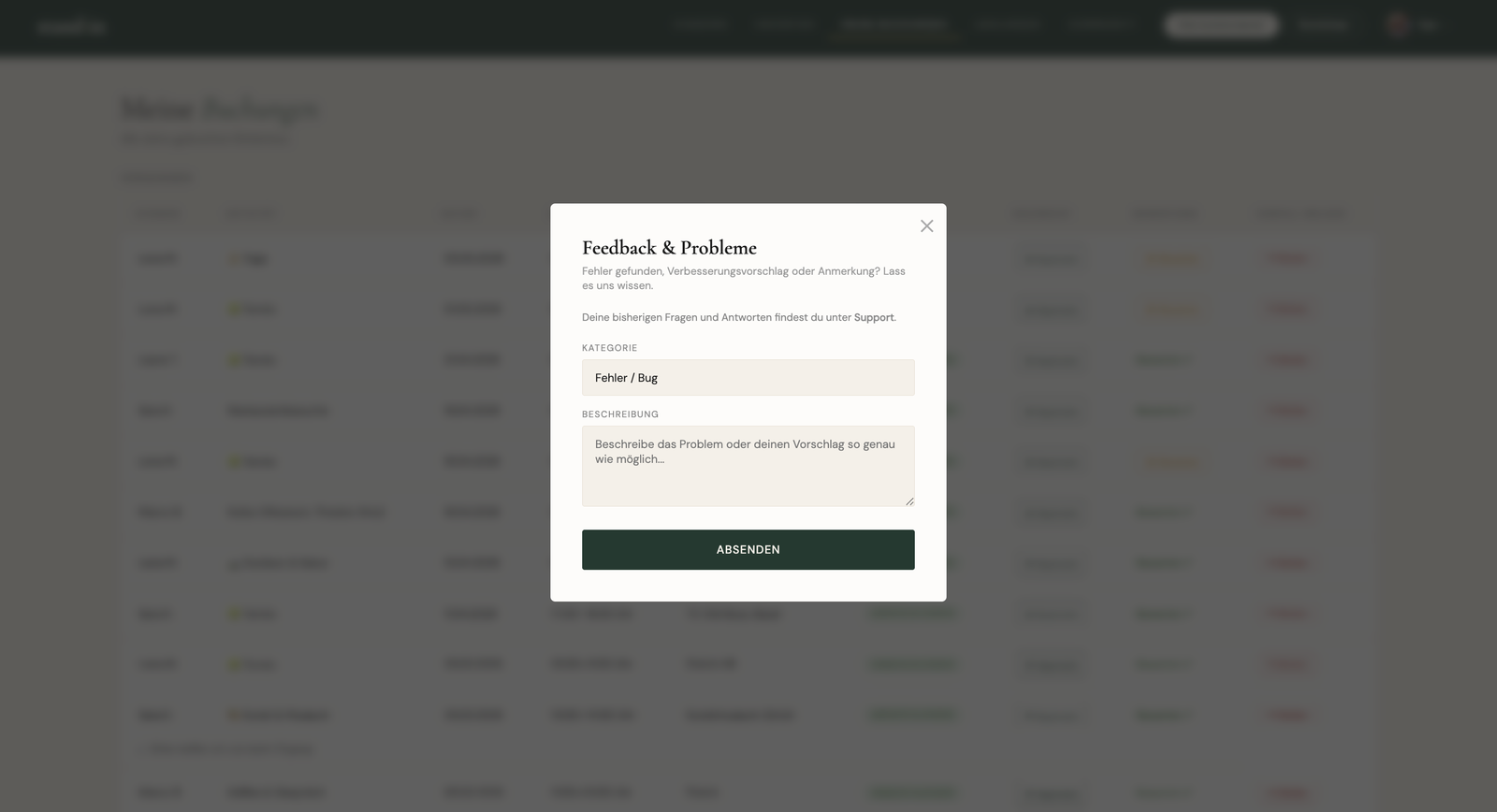
Feature · Feedback & support Both

A feedback and support feature where users can ask questions when they run into trouble, report a problem or a bug, or simply say thanks and tell us what they like. Each message is filed under a category (question, bug, suggestion, praise, …), goes to the admin, and the admin can reply right inside the app.

Feedback and support modal with a category select and message
standins.html · submitFeedback()
// categories: question · bug · suggestion · praise · other
const category = fbCategory.value
const message  = fbMessage.value.trim()
if (!message) return showError("Bitte Beschreibung eingeben.")

await supabase.from("feedback").insert({
  user_id: currentUser.id,
  category, message,
  page: "standins",
  user_agent: navigator.userAgent,
})

// admin is notified, and can reply right inside the app
await supabase.functions.invoke("send-email", {
  body: { type: "new_feedback", feedback: { category, message } },
})
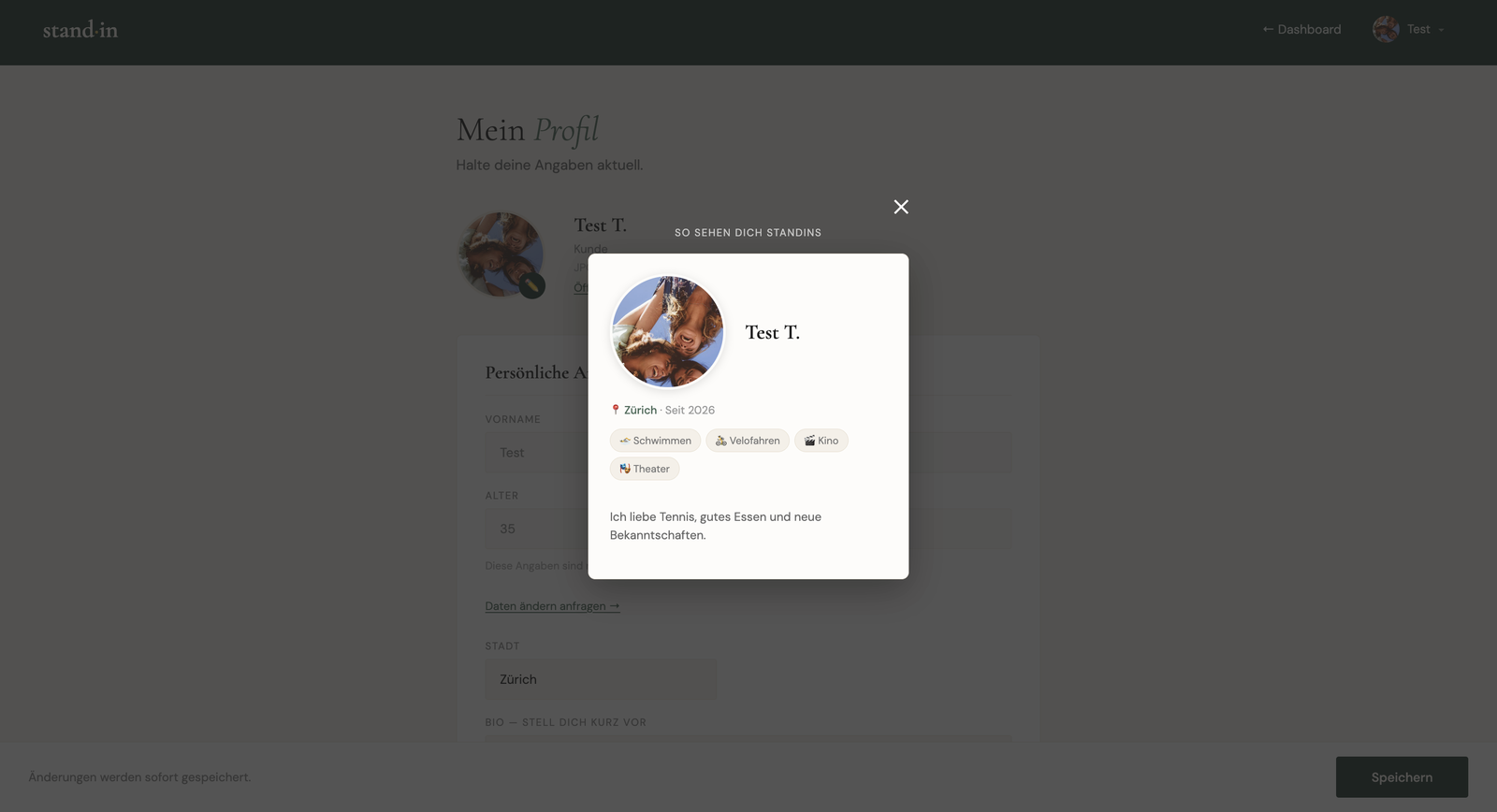
Feature · Profile preview Both

A profile-preview feature where both customers and standins can see, right from their own profile, exactly how they're shown to the other side: a customer sees how standins see them, a standin sees how their profile appears to customers. It's the very same card that's used in the listing.

Profile preview showing how the user appears to the other side
profile.html · openAvatarPreview()
const isStandin = profile.role === "standin"

// the header adapts to who is looking
previewHeader.textContent = isStandin
  ? "So wird dein Standin-Profil angezeigt"
  : "So sehen dich Standins"

// render the exact card customers see in the listing:
// avatar, price, tags, "Neu" badge, rating (standins only)
previewCard.innerHTML = renderStandinCard(profile, { reviewCount })
Feature · Richtlinien Both

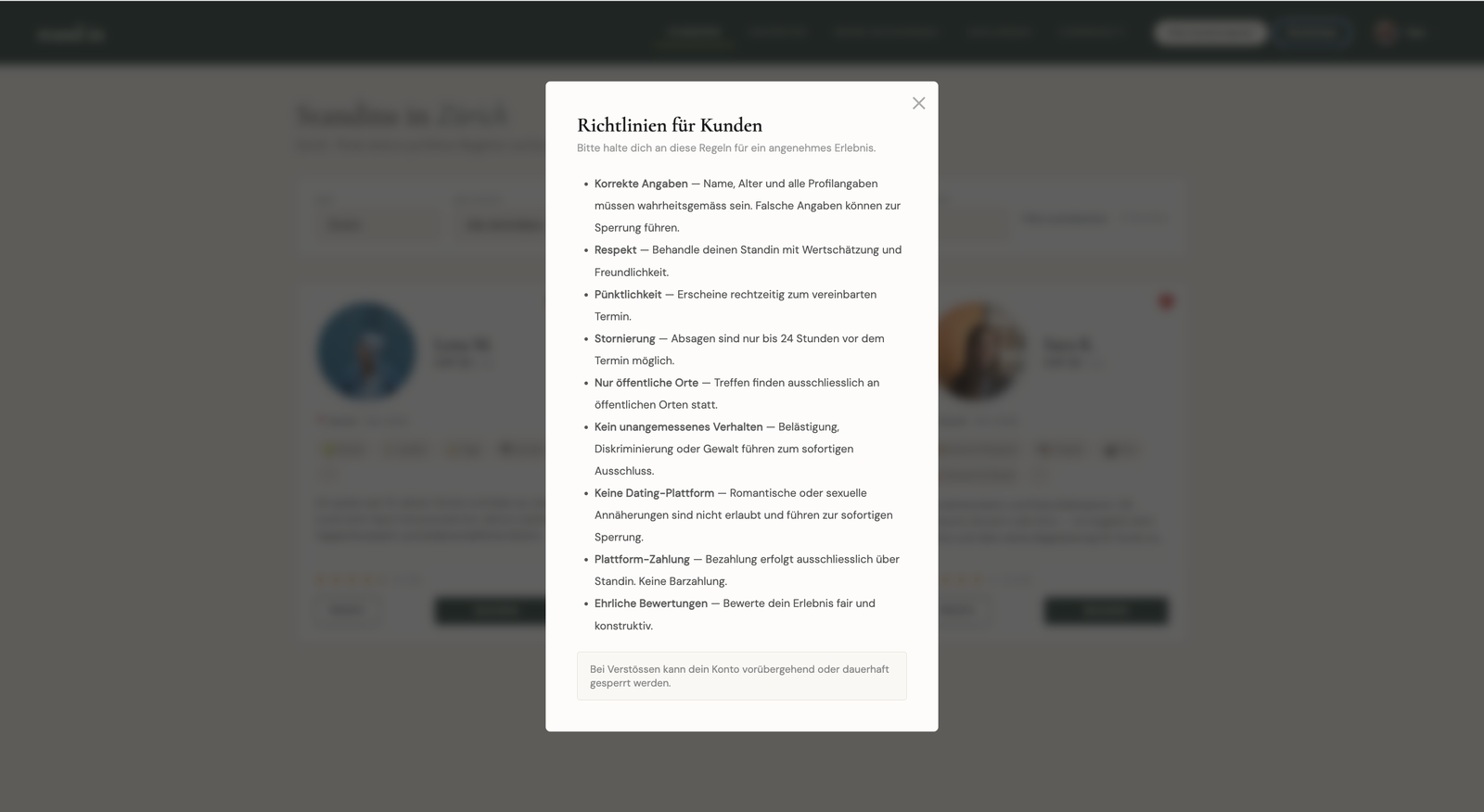
I wrote community guidelines for both standins and customers: clear rules on how to behave and on where and how to meet. They draw a sharp line: Standin is explicitly not a dating platform and has nothing to do with escort services. Meetings happen only in public places, and the basics (no harassment, no racism, no discrimination) are non-negotiable. Everyone has to agree to them, and if someone breaks the rules any user can report that person, who can then be removed from the platform.

Community guidelines modal: rules for behaviour, meeting in public, no dating or escort
standins.html · Richtlinien-Modal
<ul>
  <li><strong>Nur öffentliche Orte</strong>: Treffen finden
      ausschliesslich an öffentlichen Orten statt.</li>
  <li><strong>Korrekte Angaben</strong>: Name, Alter und alle
      Profilangaben müssen wahrheitsgemäss sein.</li>
  <li><strong>Kein unangemessenes Verhalten</strong>: Belästigung,
      Diskriminierung oder Gewalt führen zum sofortigen Ausschluss.</li>
  <li><strong>Plattform-Zahlung</strong>: Bezahlung nur über
      Standin, keine Barzahlung.</li>
</ul>

// Verstoss? → jeder kann melden, Konto kann gesperrt werden
<div class="note">Bei Verstössen kann dein Konto vorübergehend
  oder dauerhaft gesperrt werden.</div>
Admin & Moderation

Operating a two-sided marketplace

A marketplace doesn't just need customers and companions. It needs someone keeping it safe and running. A private admin surface, gated server-side by an is_admin check and row-level security, is where that happens. A bar across the top gives the state of the platform at a glance: how many customers and companions have signed up, how many bookings have been made, the gross revenue, and the platform's own earnings from its fees.

From there the work is split into clear areas, each its own tab: Users, Bookings, Reviews, Reports, Verifications, Change requests, Payouts, Feedback, Community, Leaderboard, and a live preview of every page.

Each area carries the actions that belong to it: sending a password reset, hiding, suspending or deleting an account, cancelling a booking, removing a review, reading and approving reports, verifying a user, approving or rejecting personal-data change requests, approving a companion's payout, answering feedback, questions and problems, taking down community posts, and seeing how companions rank on the leaderboard. The live preview lets the admin view every page of the app at any time, all from one place.

Privacy shaped what the admin gets to see at all. I was deliberate about keeping customer data to a minimum here: anything not needed to carry out a task is either left off the screen entirely or shown redacted, so only the bare essentials are visible. Moderating a report or releasing a payout never means putting someone's full personal record in front of an admin.

Onboarding

Walk through the onboarding

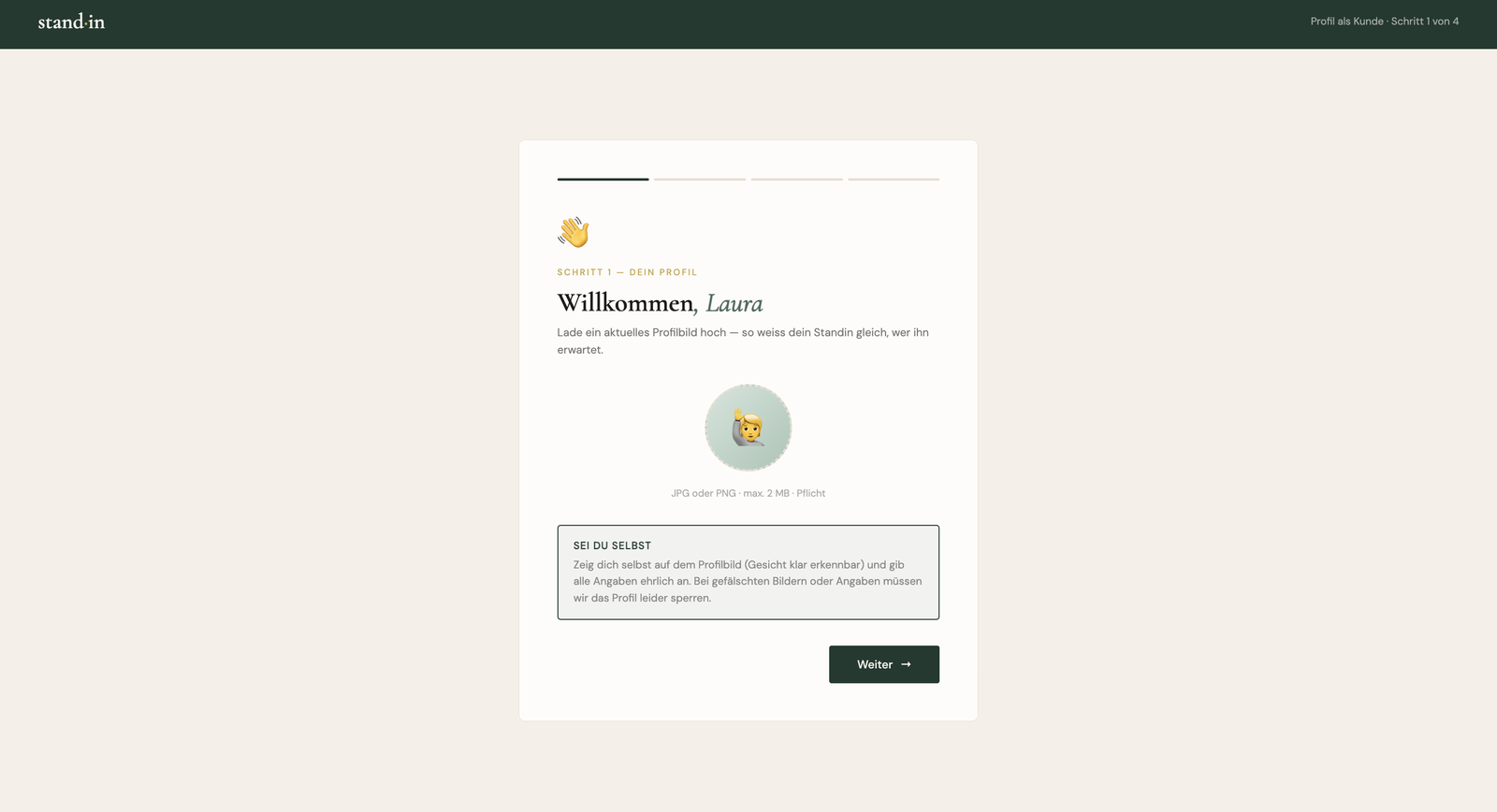
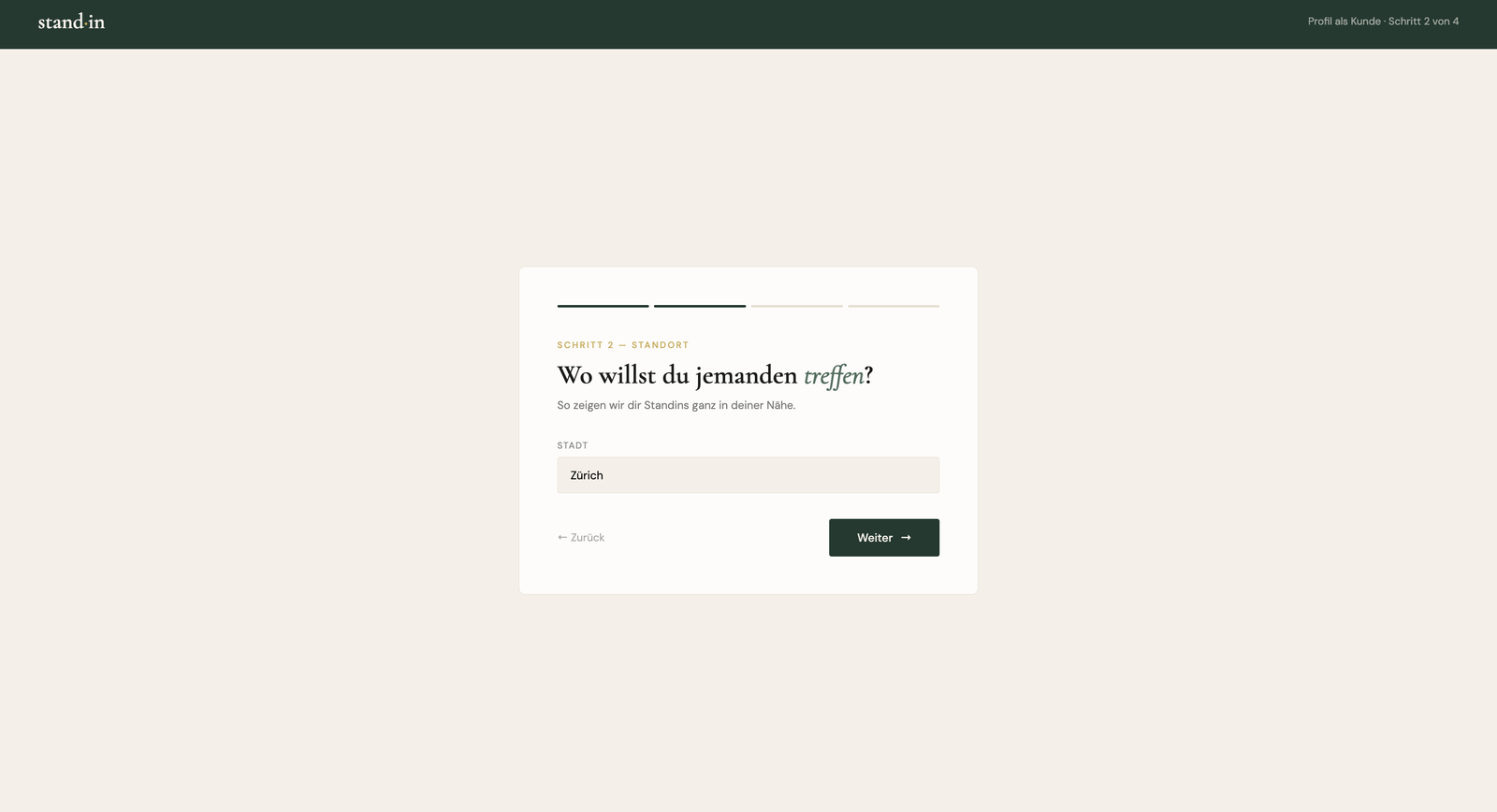
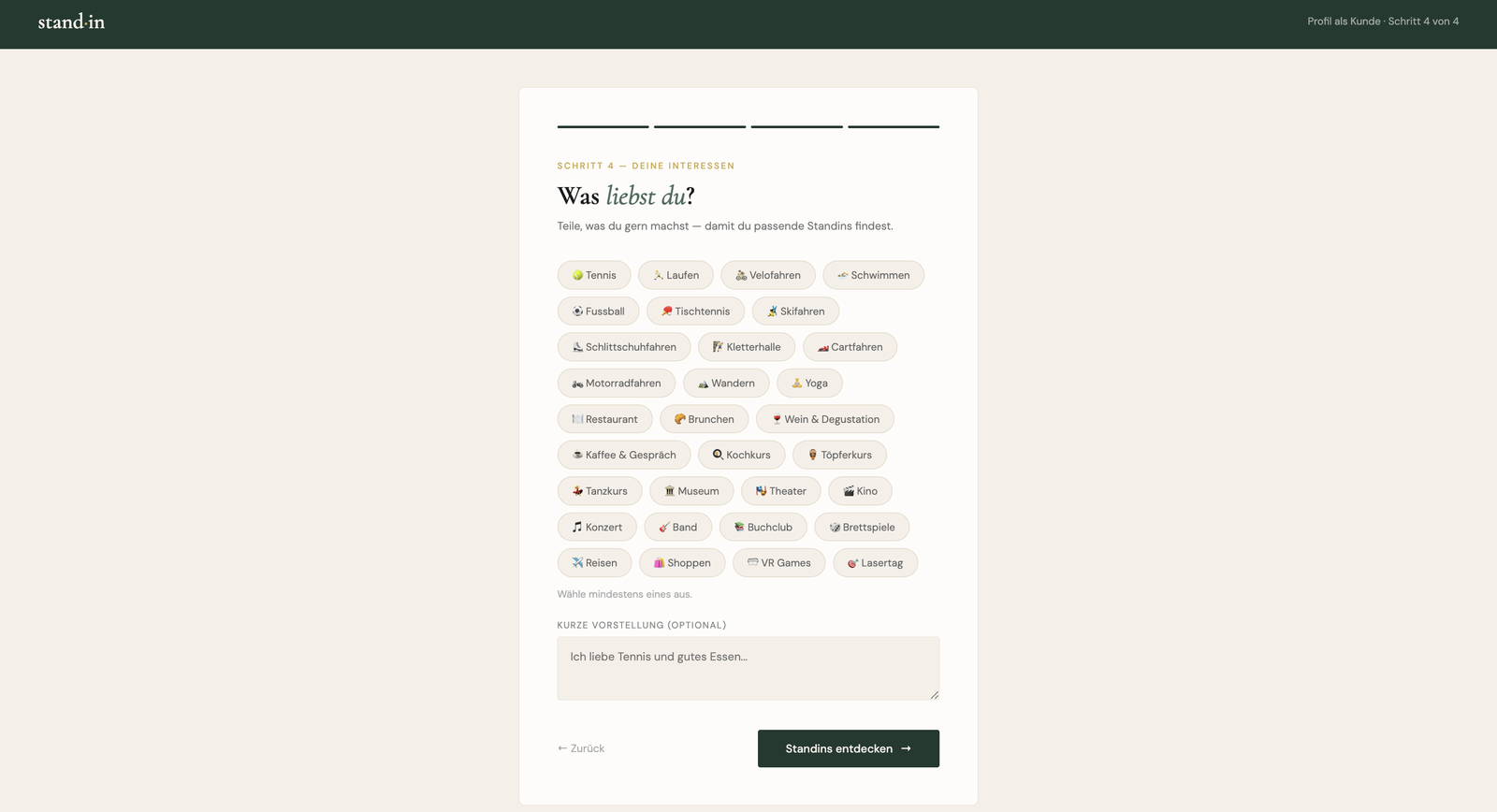
New customers sign up through a guided four-step flow: a profile picture, the city they want to meet in, a few personal details, and their interests. Step through it yourself below.

Step 1 of 4
Onboarding step 1: upload a profile picture
Profile pictureUpload a photo so companions know who they're meeting.
Onboarding step 2: choose the city to meet in
Your cityPick the city you want to meet in, so you only see nearby companions.
Onboarding step 3: name, gender and date of birth
A few detailsName, gender and date of birth, every field labelled public or private.
Onboarding step 4: pick your interests
Your interestsChoose what you're into, then you land straight in the matching companions.
Key screens

Across the platform

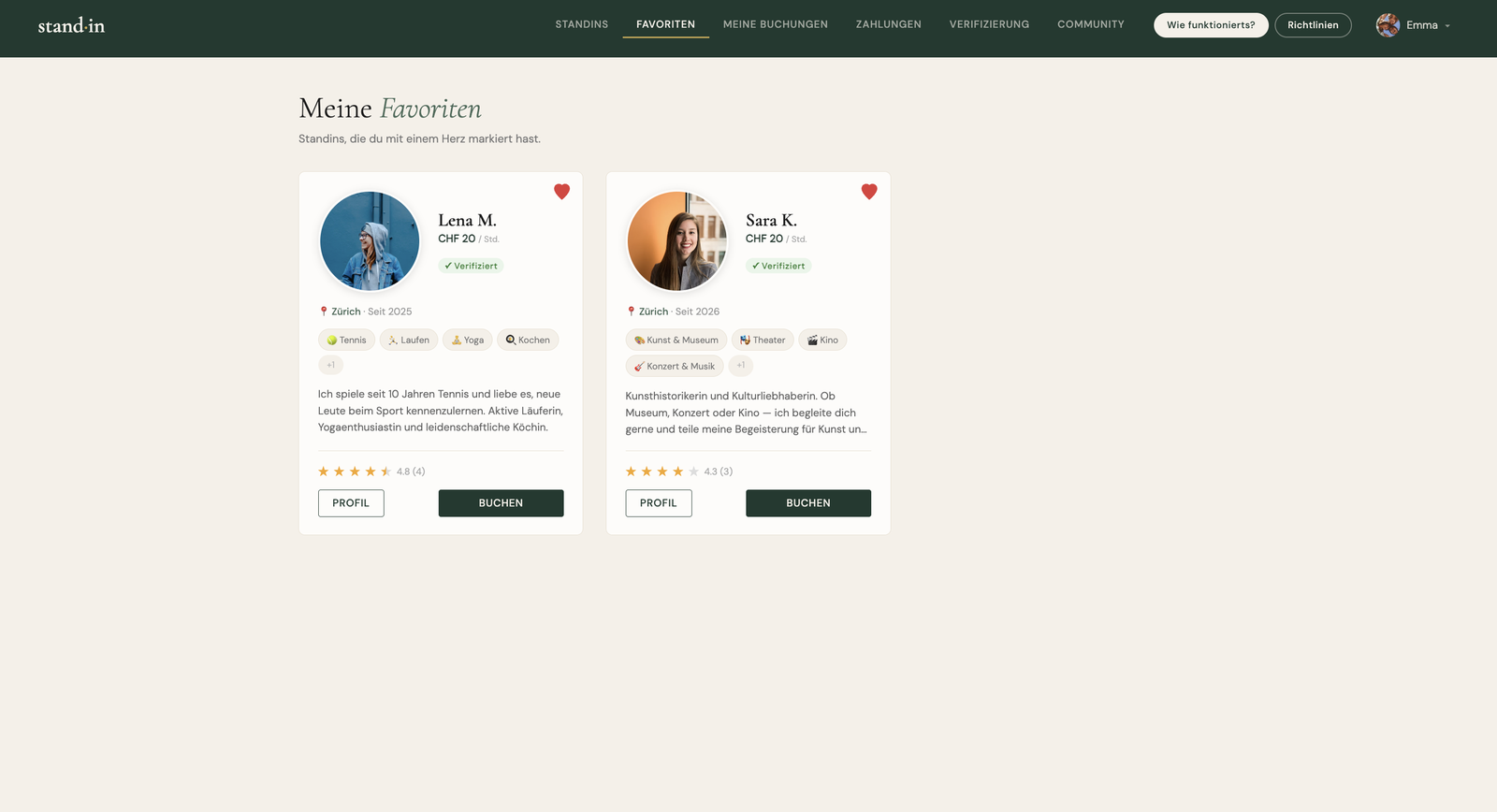
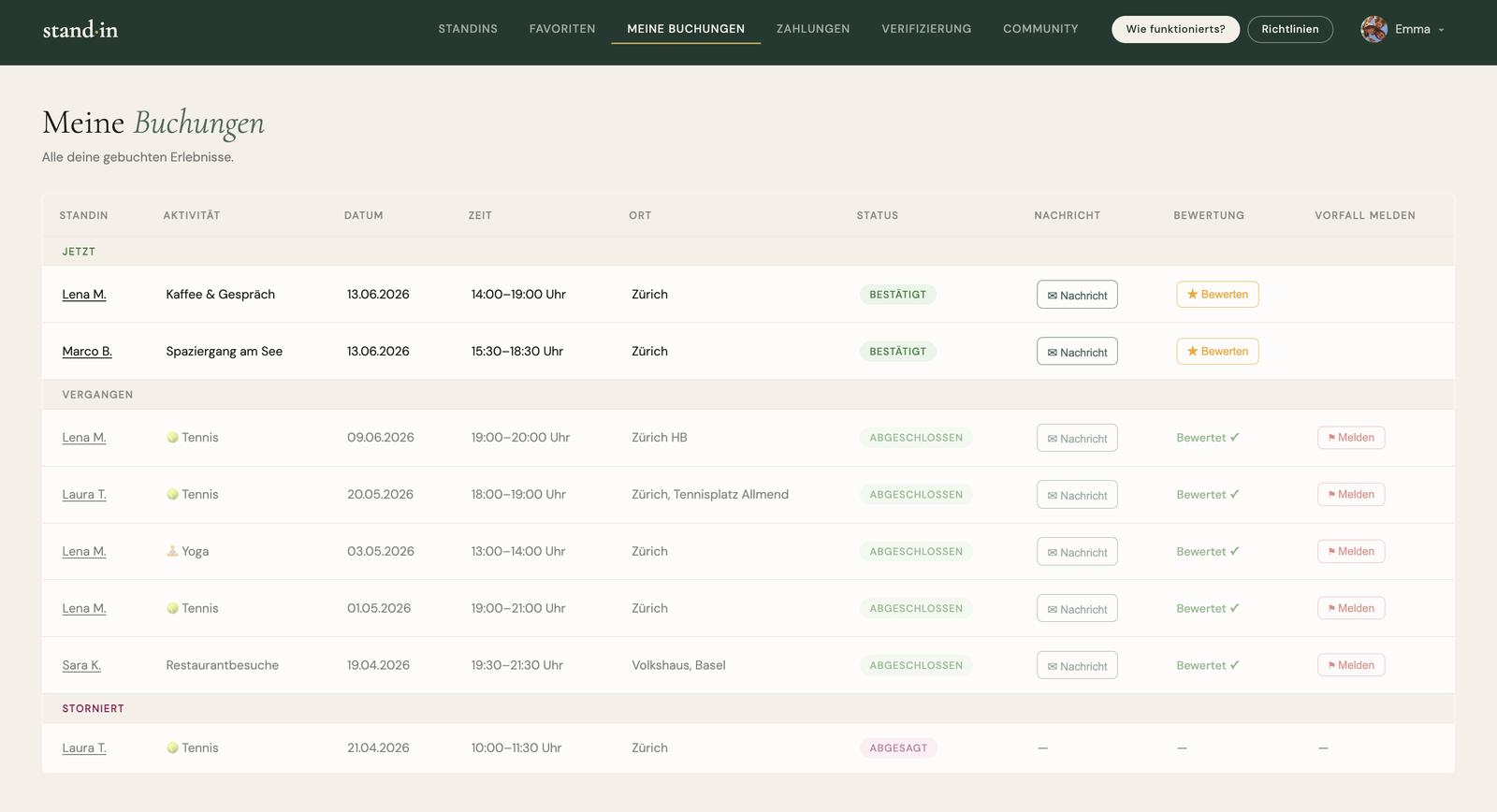
Core views from the shipped application, across both sides of the marketplace: from discovery, booking and payments to profiles, availability and the leaderboard.

Design Decisions UX

A clear, minimal product, built on the original design

I focused above all on the functional side of the design: a clean, minimalist interface with clear, strong, self-explanatory copy and only the functions that are genuinely needed. The platform does a lot (onboarding, discovery, booking, payments, chat, reviews, reporting, payouts), yet it still feels simple, uncluttered and very intuitive to use.

The admin area lets every feature be managed and monitored from one clear overview. And because the product processes personal information about both customers and standins, I was deliberate about privacy, collecting only the data that's strictly necessary and protecting it where it matters. Visually I stayed true to the original Standin design and built on it rather than reinventing it: the same forest green, gold and warm beige throughout.

Palette
ForestGoldSageSandCream
Stack
{ }TS
Supabase · Postgres, Auth & Edge Functions
TypeScript · Edge functions on Deno
Stripe · Checkout & signed webhooks
Resend · Transactional email
GitHub · Version control
AI-assisted · Claude in the build workflow
Usability Testing UX

Tested the booking flow with real users

A working product still needs to be usable. I ran moderated, in-person usability sessions with two users, one of whom I tested with twice. Each of them first had to register and complete the onboarding to set up their profile, then browse the standins (exactly the start any real user has) before searching for a companion, picking a slot and completing a payment.

I watched where they hesitated, dropped off or misread something. Booking and payment worked flawlessly for every tester, and on the whole they found the product intuitive and easy to use. Everyone really liked the design, and they were taken with the concept itself: they said they'd definitely need a product like this, though they weren't sure how often they'd use it, since after a first meeting people might simply meet up again off the platform. Beyond the flow, the sessions surfaced three things they wished the product did differently, all rooted in the fact that this is about meeting real people in real life.

Two of those wishes I acted on; the third I deliberately held back. What I changed, and the reasoning behind each call, is in Iteration.

"I'd feel safer meeting a standin in real life if they were verified first. That's the thing that would make me trust it."
Testing

Tested for the breaks, not just the happy path

Testing was deliberate and hands-on rather than a large automated suite. The whole customer journey (register, onboard, find a companion, book, pay, cancel, review) runs as a written end-to-end checklist against a fresh account, so onboarding and edge cases are never accidentally skipped.

The point isn't the happy path, it's the breaks. The checklist forces the failure modes on purpose: a rejected test card, a double booking on the same slot, an expired slot, a cancellation inside the 24-hour window, each with a defined, verified behaviour.

Payments run in Stripe's test mode with the standard test card, all the way through the signed webhook to a confirmed booking, the same path a real user triggers, minus the money. And before the booking flow was settled, I ran it past real people, not just myself.

"Test the failure modes, not just the happy path."
Bugs & fixes

Bugs I hit, and how I fixed them

Some of the most important work on Standin was never visible in the interface: finding and fixing errors whose real cause was hidden behind a misleading symptom. The following are the ones that stand out, found and fixed while building and running the product.

Login

Users could not log in, and the error message was misleading

Users were unable to log in. The screen reported that the email or password was incorrect, but resetting the password did not help, because that was never the actual problem. The real cause was that the project's database, running on Supabase's free plan, paused itself automatically after seven days without activity. This had nothing to do with the amount of stored data, which is what I first suspected. While the database was paused, no one could sign in.

Solution

I first had to identify the real cause, since the failure looked like an incorrect password. Once it was clear that the paused database was responsible, I set up a scheduled task on GitHub that contacts the database automatically every two days. This keeps the inactivity timer from ever running out, so the database no longer pauses. It runs on GitHub's servers, costs nothing, and needs no manual restart. In addition, I replaced the misleading message: instead of stating that the email or password is wrong, it now indicates that the service cannot be reached at the moment, so users understand that the problem is not on their side and do not try to reset a password unnecessarily. Looking ahead, a paid plan would remove the seven-day limit entirely and handle heavier usage without throttling, and monitoring could alert the admin immediately so they can react without delay.

Pricing & checkout

The booking price was calculated and charged incorrectly

The booking flow contained two separate pricing errors, one after the other. In the first version a booking was deliberately simple: to keep the model lean, every activity was a fixed one-hour event at a fixed price, so there was nothing to calculate. Later, bookings could last 1.5 hours or more, and companions could set an individual price for each activity, which is where the errors came from. The first error was in the booking step: the price was not recalculated for the chosen duration. If a customer selected 1.5 hours, the booking still showed only the price for one hour. Once that was corrected, a second error remained in the payment step: Stripe was always sent the fixed standard price of 20 and did not use the individual price that a companion had set for the selected activity.

Solution

I fixed the two errors in sequence. First I corrected the calculation in the booking step so that the price is the hourly rate multiplied by the actual duration of the slot, which means 1.5 hours is now priced as 1.5 times the hourly rate. Then I corrected the amount sent to Stripe so that it uses the individual price of the booked activity, and only falls back to the standard price when no individual price is set. To make this reliable, the server now calculates the final amount itself from the stored booking data instead of relying on the value sent by the browser, so a manipulated request cannot lower the price that is actually charged, and the price the customer sees, agrees to and pays is always the same.

Booking logic

Past time slots could still be booked

The list of available slots was filtered only by date, not by time. As a result, the current day counted as fully available, including the hours that had already passed. For example, if a companion was available from 14:00 to 16:00 and a customer opened the booking window at 15:30, that slot was still shown as free and could be selected, even though it had already started. It was therefore possible to book and pay for a time that was already in the past or currently running.

Solution

I changed the filter so that it compares both the date and the time against the current moment, instead of the date alone. After the slots are loaded, any slot that starts before the current time is removed, so slots that are already running or in the past no longer appear in the selection. While working on this I also found a related time bug in the new payments overview, where a timestamp was shown in the wrong time zone, which I corrected separately. As a next step, a minimum lead time of four hours is planned, so that a companion always has enough time to prepare and travel to the meeting point before a booking starts.

Authentication

The password reset page did not work

When a user clicked the reset link in the email, the field for entering a new password never appeared. Instead, the user was taken straight to the dashboard, without ever getting the chance to set a new password. The reset link signs the user in through a recovery token, and the page's redirect logic, which normally sends a logged-in user to their own area, ran as soon as the page loaded and therefore took effect before the reset screen could be shown. The underlying cause was a timing problem between the login event, which arrives asynchronously, and the redirect code that runs immediately when the page loads, so depending on the timing the user was sent away before the reset was even recognised.

Solution

I made sure the reset process always takes priority over the redirects, and I built the detection so that it cannot be missed. The reset state is now recognised from three independent sources: the address of the link, a query parameter, and a stored marker that survives page reloads and navigation. In addition, a listener reacts to the password recovery event even when it arrives late. While the reset is active, every redirect is blocked and a dialog asks the user for the new password, so the process now works reliably regardless of timing or which page the user lands on.

Frontend

The message button did not work for some bookings

The message button passed the complete booking data, including names and activity descriptions, directly into the button's click handler in the HTML. The problem was that this data sat inside an attribute that is itself wrapped in quotation marks, so the first quotation mark inside a name or description ended the attribute too early and broke the rest of the markup. Special characters such as an apostrophe in a name had the same effect. The result was an invalid handler, so the chat either did not open or produced an error, depending on which booking was clicked. It looked like a backend problem, but the cause was entirely in the frontend.

Solution

Instead of placing the booking data inside the HTML, I now store each booking in a lookup table when the list is rendered and pass only its ID to the button. An ID contains no quotation marks or special characters, so it cannot break the markup, and the full booking is retrieved from the table when the button is clicked. In addition, any message text is treated as plain text when it is displayed, instead of being inserted directly into the page, which prevents the same kind of problem from appearing again inside the chat itself.

Backend & security

Deleting a user left their data in the database

Deleting a user in the admin area did not behave consistently. Sometimes the request failed silently with an authorisation error and nothing happened. Other times the user disappeared from the list but remained in the database together with all related data, such as bookings, messages and reviews. Two real errors, a missing authorisation token and missing cleanup of the user's profile, were combined with an intentional design decision to delete users in a reversible way first, which made it hard to tell what was a bug and what was intended.

Solution

The delete function now reads the authorisation token from the request and passes it correctly, which resolved the failed requests. For a final deletion it removes the user's files, deletes the profile so that all related data is removed automatically, and then removes the account, with a clear error message at each step. Deletion remains a two-stage process: a reversible removal first, followed by a permanent deletion that requires an explicit confirmation. Administrators cannot delete other administrators.

Matching logic

Companion preferences were not applied

A companion can define which customers they want to accompany, for example by gender or by age group. This setting was saved correctly, but it was never applied when the list of companions was shown to customers. The customer view only applied the filters that the customer themselves set, such as city, activity or price, and never checked the companion's preference in the other direction. As a result, a customer could see companions who had explicitly chosen not to accompany customers of that gender or age group. The data existed in the database, the filter for the customer view simply did not read it.

Solution

When the list of companions is built, it now also checks each companion's own preference against the logged-in customer's gender and age, and hides companions that do not match. The age check is intentionally tolerant, so that a missing preference or a missing age never excludes anyone by mistake. The same correction had to be applied on both pages where customers browse companions, because the filtering existed in both places and fixing only one would have left the problem active on the other. In the admin preview the filter is skipped on purpose, so that an administrator can still see the complete, unfiltered list of companions.

Database & RLS

Database security rules failed without any error

Two separate problems had the same underlying cause: the database security rules block access without reporting an error. When a rule does not allow something, a read simply returns no data and an update simply changes no rows, but no error is raised. Because of this, two issues were hard to spot. In the companion's dashboard the customer's name was missing, because companions had no permission to read the profile of their customer. And in the admin area, actions such as suspending, deleting or changing the status of a user showed a success message even though nothing had actually changed in the database.

Solution

I solved it on both sides. For reading, I added a specific rule that allows the two users who are connected by a booking to read each other's profile, and nothing more, after which the customer's name appeared again. For writing, each admin action now checks how many rows were actually changed and reports a clear error when none were, instead of showing a success message that is not true. This check was added to every admin action that changes data, so a blocked change is now always reported instead of silently appearing to succeed.

Iteration

What changed once it met real use

Like any real build, parts of Standin changed once they met real users rather than a plan on paper. The most useful changes came from hitting an actual limitation (in the data model, the booking logic, or the flow), not from anticipating a theoretical one.

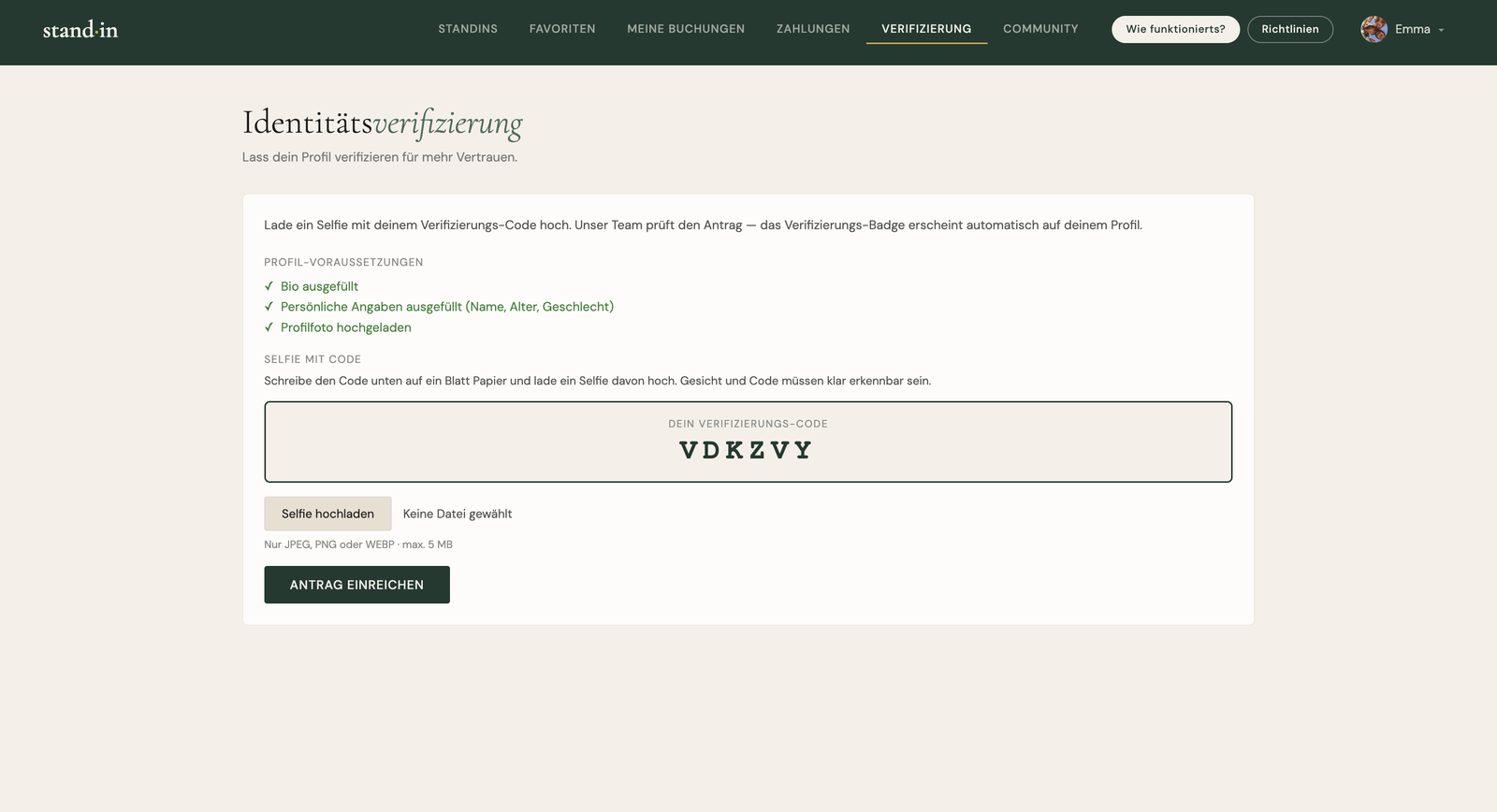
The clearest example was verification. I had actually built a verification feature early on, then took it back out before the usability test: this is an MVP, everyone already has to confirm their email at registration, and I didn't want to raise the data hurdle any higher than it needed to be. The sessions reversed that call: testers consistently cared more about knowing the other person was verified than about giving up a little of their own privacy. So verification went back in, this time open to every user, with the admin reviewing each request and a “✓ Verifiziert” badge on the profile.

Pricing changed the same way. At the start I deliberately kept it as simple as possible for the MVP (a single base price per companion) just to see whether the principle works at all and whether there's real demand, before adding any complexity. Once it was clearly resonating, the flat rate started to feel wrong: one price doesn't fit when a person offers very different activities. So pricing moved to per-activity, each one priced on its own.

The free option is the one place I deliberately didn't follow the testers. Their point was fair: money doesn't fit every activity, sometimes it really is just about spending time together. But the core idea of Standin is that you pay for a companion: there are already platforms for finding people to do things with for free, and Standin lives on its fees. Paying is also what lets the platform guarantee you can always find someone, without searching forever for the perfect match or building a friendship first. It's about getting an activity done, for people short on time or contacts, and it gives younger people a real way to earn money while meeting others. Two users weren't enough to outweigh that, so I held the free option back: first prove that the paid principle resonates, then add it later as an optional extra if it's still wanted.

Changes

The changes test users asked for most, all built straight into the product after usability testing.

What's next

Roadmap & next steps

The MVP is live. Now the focus moves from building to validating: testing it with real people, sharpening the experience, and making sure it holds up.

Now
Pilot with real users
Run the platform with real companions and customers to see whether it genuinely works in practice, and what's still missing. Open questions to settle through real bookings: how to handle a meeting that runs longer than booked, and how much lead time a companion needs to prepare and travel to the agreed location.
Next
Mobile optimisation
Refine the responsive layouts so the whole flow (discovery, booking and the dashboard) feels as smooth on a phone as on desktop, since most people will book on the go.
Later
Automate companion payouts
Right now an admin reviews each companion's payout request and marks it paid by hand. The plan is to automate that end to end, so approved earnings are paid out on a schedule without a manual step, most likely via Stripe Connect.
Ongoing
Security audit & data hardening
A dedicated security review and tighter safeguards around the data in the admin area, keeping sensitive user data well protected as the platform grows.
Outcome

From concept to shipped platform in 12 weeks

In twelve weeks Standin went from an empty repository to a working, two-sided marketplace in production: users can discover companions, book and pay, cancel and review, all on a codebase built to be handed to a team rather than thrown away after the MVP.

Shipped end to end
A complete two-sided marketplace, from database schema to deployed frontend, built solo in twelve weeks.
Reliable by design
Payments are confirmed by signed Stripe webhooks and written idempotently, so there are no ghost or duplicate bookings.
Ready to hand over
A codebase organised around clear domains, typed where money and trust live, that a team could pick up without a rewrite.
Strengths

What I'm especially good at

Across this build, these were the parts of engineering I felt most confident in and enjoyed the most, from shaping the data model and the architecture to the money-and-trust paths where mistakes are expensive.

  1. Building the whole platform logicArchitecting the entire platform and the logic that ties it together, and building the individual components so they fit into one coherent whole. This is where I am strongest: turning a complex, two-sided system into something that actually works end to end.
  2. Inventing the conceptComing up with the whole idea from scratch and then making it real: from the core concept of booking people for activities all the way down to exactly how it works in practice. A handful of platonic companion services exist internationally, but the idea is far from established, and in Switzerland there is barely anything like it.
  3. Learning & adapting fastDoing many of these things for the first time and picking them up quickly, learning each new piece as the build demanded it and adapting on the fly without slowing the project down.
  4. System architectureDrawing clear domain boundaries so the codebase can grow from MVP toward production without a rewrite.
  5. Database designModelling the schema and access rules first, with row-level security enforcing ownership and privacy at the database itself.
  6. Backend developmentWriting typed edge functions for the server-side logic, where typed inputs and responses catch integration bugs early.
  7. Payment integrationWiring Stripe Checkout with signature-verified webhooks as the single source of truth, so a booking is only written once payment is confirmed.
  8. Security & privacyPushing ownership and privacy rules into the database, so the same guarantees hold no matter which page or function makes the request.
  9. Intuitive booking flowShaping a booking flow that runs flawlessly once I had solved a handful of bugs, which matters most of all because it is the product's core function.
  10. Inventing featuresComing up with the features that make the platform tick: the messaging between standin and customer, the standins' availability dashboard, the request flow that lets users ask to change the data in their profile, and the community space where a standin and a customer can post about a shared experience together.
  11. Admin dashboardBuilding one central admin dashboard to steer and manage many of the app's key functions, so running the platform never means logging into several separate tools.
  12. Privacy by designStriking a balance between trust and privacy: asking only for the data that is genuinely needed and keeping details like surname and age out of public view, so users enjoy real privacy while staying visible enough for things like the standin ranking.
  13. Role-specific dashboardsCreating clear, self-explanatory dashboards for both standins and customers that hold only the functions each role actually needs. They do a lot, yet still feel tidy and minimal, so people get their bearings quickly.
  14. Guided onboardingDesigning an onboarding that does ask for some data but splits it so logically that it never feels like much work, letting users complete their profile easily, guided one step at a time.
  15. Standin profilesDesigning profiles in the customer dashboard that carry every important detail without feeling overloaded, including a clean review section.
  16. Frontend developmentBuilding fast, server-light responsive pages that talk to the backend directly, without a heavy framework to maintain.
  17. Deployment & infrastructureTaking the app from local to a deployed production environment and keeping it shippable throughout.
  18. AI-assisted workflowUsing Claude to accelerate implementation while owning the architecture and every key decision myself.
  19. TestingWriting end-to-end checklists and running usability sessions to break the unhappy paths before users do.
Reflection

Lessons from building a marketplace solo

Results & Impact

  • Full-stack delivery: A complete two-sided marketplace (from database schema to deployed frontend) shipped by one developer in twelve weeks, covering onboarding, discovery, booking, payment, cancellation and reviews.
  • Reliability: Payments are confirmed by signed Stripe webhooks and written idempotently, so there are no ghost or duplicate bookings, and cancellations refund and free the slot automatically.
  • Code quality: The money-and-trust paths run in typed edge functions, with ownership and privacy enforced by row-level security in the database: a codebase organised around clear domains that a team could pick up without a rewrite.

Key Learnings

  • Build the schema first: Starting with the tables and access rules and working upward caught structural mistakes weeks earlier than a UI-first approach would have. Every feature benefited from having the data model right before the first page was written.
  • Test the breaks, with real people: A written end-to-end checklist plus moderated usability sessions surfaced issues that clicking the happy path alone never would: rejected cards, double bookings, and the small confusions only a real user reveals.
  • Let the database hold the rules: Pushing ownership and privacy into row-level security meant the same guarantees held no matter which page or function made the request, far safer than re-checking in every screen.
Next case study
Sashimi: Luxury Sushi Restaurant App
Sashimi app